How to Connect AI Agents to Your Business Messaging Inbox for Automated Triage and Drafting
Learn how AI agent messaging automation streamlines customer inbox triage, drafts context-aware replies, and supports multi-channel support workflows.
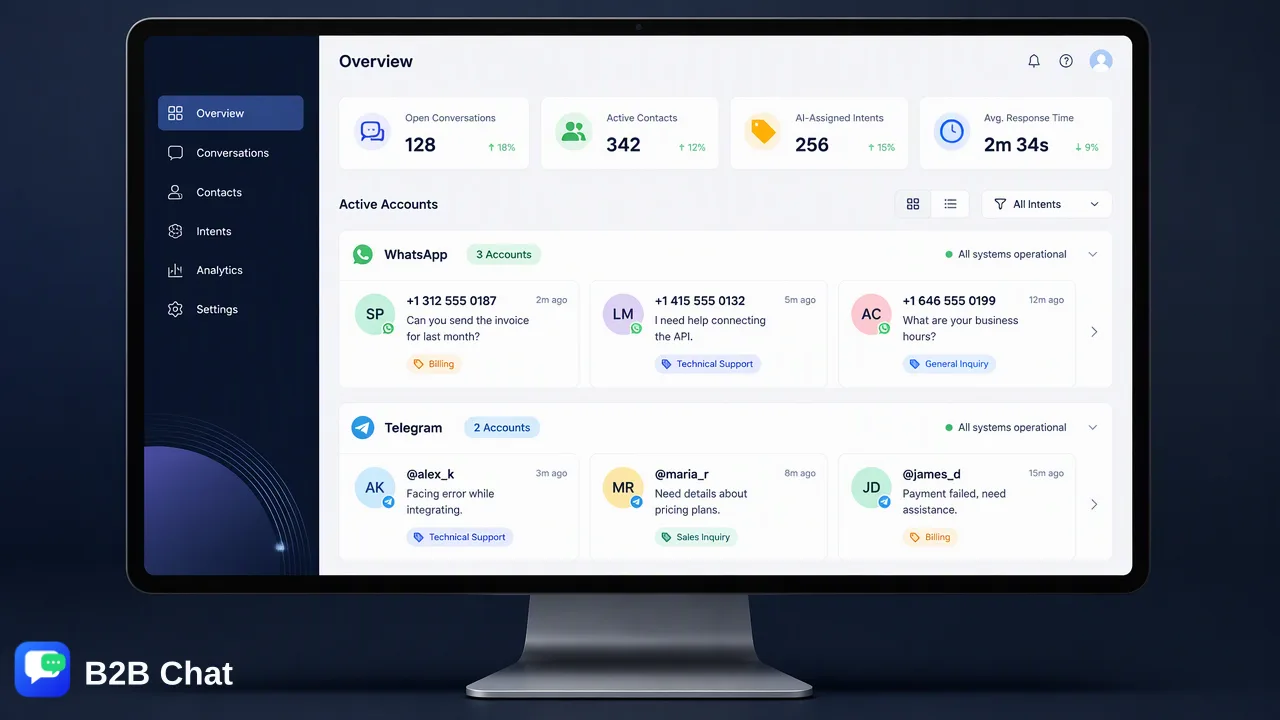
Learn how organizations deploy AI agent messaging automation across customer channels to evaluate incoming intent, draft context-aware replies, and streamline inbox triage while keeping human agents in control.
Connecting AI agents to a business messaging inbox allows organizations to automate conversation triage, generate contextual reply drafts, and interpret incoming customer intent across live chat channels. By deploying intelligent customer service tools within a centralized messaging workspace, teams eliminate the friction of juggling disconnected apps. Rather than relying on rigid decision-tree bots that frustrate users, modern AI customer service systems evaluate full message context to assist frontline representatives with pre-drafted responses, supporting fast resolution while preserving human editorial oversight.
The Evolution of Messaging Automation: From Bots to AI Agents
Customer communication channels such as WhatsApp, Telegram, and LINE have become central touchpoints for modern global enterprises, yet managing high-volume incoming inquiries remains an operational challenge. For years, businesses attempted to scale conversational support using rule-based chatbots. These legacy systems operated on static keywords and rigid decision trees, frequently failing when customer queries deviated from narrow, scripted syntax. AI agent messaging automation marks a fundamental shift in how customer interactions are processed. Instead of forcing conversations into predefined branches, AI customer service technology evaluates conversational context and customer intent directly from incoming messages. By analyzing earlier dialogue and interpreting nuances, AI systems can assist with relevant, context-rich first-line responses. | Capability | Traditional Rule-Based Bots | Context-Aware AI Agents | | :--- | :--- | :--- | | Query Interpretation | Exact keyword matching and branch logic | Intent understanding from conversational context | | Response Generation | Pre-written static templates | Contextually adapted reply drafting | | Adaptability | Breaks on unexpected phrasing or complex issues | Synthesizes full conversation history to support resolutions | | Operational Role | Rigid automated deflection | Decision-support and triage assistance for teams |
Streamlining Triage Across Centralized Messaging Channels
A significant hurdle in managing customer messaging operations is platform fragmentation. Support teams often balance multiple WhatsApp numbers, regional LINE accounts, and Telegram community channels across disparate browser tabs and mobile devices. This decentralized setup leads to delayed response times, uneven triage, and siloed context. Centralizing messaging operations into a single client environment resolves these operational bottlenecks. The B2B Chat client, available for Windows and macOS, brings account aggregation and multi-login management into a unified workspace. Support personnel can connect and operate multiple WhatsApp, Telegram, and LINE accounts side by side without repeatedly logging in and out of different devices. When multiple messaging streams feed into a unified client, AI-driven triage becomes substantially more effective. Frontline supervisors and support representatives can review conversational threads from a single window, categorize incoming customer requests by intent, and prioritize urgent inquiries across platforms consistently.
Maintaining Quality with Human-in-the-Loop Drafting
While automated assistance accelerates messaging throughput, fully autonomous customer-facing automation introduces brand and operational risks. Complex issues, ambiguous billing questions, or nuanced relationship management require human judgment that automated models should not execute in isolation. Adopting a human-in-the-loop workflow balances automation speed with quality control. Under this architecture, the AI customer service system functions as an intelligent drafting copilot. When a new customer message arrives, the AI parses the conversation history and generates an appropriate draft response directly within the agent workspace. The human representative evaluates the suggestion, makes contextual adjustments if needed, and manually triggers the dispatch. This assistive workflow delivers several concrete operational benefits:
- Reduced keystrokes and manual composition: Support representatives avoid repeatedly typing out routine answers to recurring questions. - Consistent organizational tone: Drafting assistants maintain standard professional phrasing across different team shifts and tiers. - Human accountability: Operators maintain final review authority over all outbound statements, preventing errors from reaching customer devices.
Breaking Language Barriers in Cross-Border Support
For cross-border ecommerce brands, international service desks, and global communities, language complexity compounds daily inbox management. Customers expect to communicate using their native tongue on regional messaging apps, whether via LINE in East Asia, WhatsApp in Europe and Latin America, or Telegram globally. B2B Chat integrates AI Translation capabilities covering more than 200 languages. Rather than relying on third-party translation tools that require constant copy-pasting, the system provides automatic language detection within the messaging workspace. Crucially, the engine provides context-aware translation, adjusting phrasing and tone according to the ongoing dialogue rather than providing mechanical literal translations. When paired with AI customer service drafting, context-aware translation allows domestic support teams to manage global accounts efficiently. Representatives can read incoming foreign-language queries translated into their working language, review AI-drafted responses, and transmit culturally natural answers back to the customer seamlessly.
Practical Implementation Steps for Support Workspaces
Deploying AI agent messaging automation does not require extensive custom software engineering when using dedicated customer service workspaces. Teams can implement an operational workflow by following structured implementation stages:
- Establish Channel Aggregation: Download the B2B Chat client on macOS or Windows and authenticate the organization's WhatsApp, Telegram, and LINE accounts within the multi-account manager. 2. Configure Channel Routing: Organize incoming communication flows so that operational personnel have direct visibility over inbound message volume across all connected profiles. 3. Activate AI Customer Service Assistance: Enable context-aware AI intent interpretation to automatically process inbound inquiries and populate draft replies in frontline operator queues. 4. Enable Multilingual Support: Turn on automated language detection and context-aware translation across active conversation channels to assist cross-border inquiries. 5. Define Review Protocols: Establish internal guidelines ensuring that frontline agents verify AI drafts for accuracy, tone, and specific operational constraints prior to sending.
FAQ
How do AI agents differ from traditional FAQ chatbots?
Traditional FAQ chatbots rely on predetermined decision trees, static keyword matching, or rigid menus that break when customer phrasing deviates from expected patterns. In contrast, AI customer service systems use intent understanding and conversation context to interpret nuanced customer inquiries. Instead of sending repetitive generic scripts, an AI agent evaluates prior exchanges within the conversation to assist with tailored responses.
Can AI agents handle multiple messaging platforms simultaneously?
Yes. Within unified messaging workspaces like B2B Chat, teams can connect and operate accounts across WhatsApp, Telegram, and LINE concurrently. Incoming messages from different accounts and networks flow into a single desktop interface, allowing automated triage and AI assistance to operate consistently across all connected channels.
How does context-aware AI translation improve customer support?
Context-aware AI translation detects incoming languages automatically and translates customer inquiries across more than 200 languages. Rather than performing literal, word-for-word substitutions, the system adjusts expressions based on the surrounding conversation context, helping global support representatives maintain natural and professional dialogue without language barriers.
How can teams maintain quality control while using AI for drafting?
Teams maintain quality control by configuring AI customer service tools to act in an assistive capacity rather than sending unmonitored automated replies. Frontline operators review AI-generated drafts, refine tone or operational details if necessary, and approve final delivery, ensuring that human oversight guides every critical customer interaction.
Learn More
Choose the product information that fits the next step in your workflow.