When to Upgrade Your Business Communication System: A Guide for Growing Teams
Discover key signs your team has outgrown personal messaging apps and how a dedicated business communication system supports visibility and scalability.
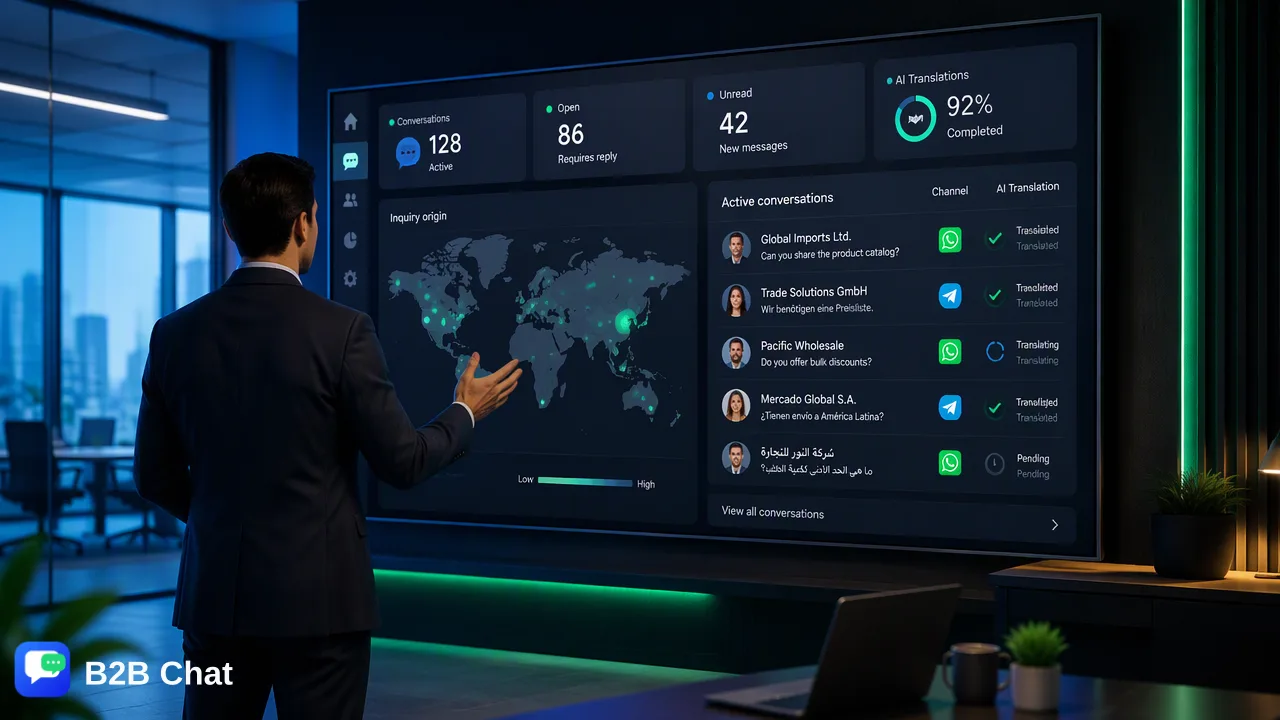
Learn the primary operational signs that indicate a growing team has outgrown personal messaging apps, and explore how transitioning to a centralized business communication system supports accountability, lead visibility, and cross-border operations.
Organizations should upgrade their business communication system when relying on personal mobile devices creates fragmented customer records, missed incoming inquiries, or operational bottlenecks across customer-facing staff. Moving from decentralized personal numbers to a dedicated messaging workspace helps teams aggregate channels such as WhatsApp, Telegram, and LINE into a shared environment. This transition establishes conversation history, supports team accountability, and introduces contextual assistance for managing higher inquiry volumes across international markets.
The Operational Risks of Relying on Personal Messaging Numbers
Early-stage companies frequently begin customer conversations using personal SIM cards and individual social accounts. While convenient initially, this informal approach introduces significant structural liabilities as lead volume expands. When customer dialogues take place on personal devices, business records remain isolated in silos. This lack of centralized visibility complicates lead tracking and weakens institutional memory: if an employee departs or changes their phone number, critical customer relationship context often disappears with them. Furthermore, handling business communication through personal channels introduces governance vulnerabilities. Organizations cannot easily separate professional client interactions from personal chats, raising the risk of accidental information leaks or inconsistent communication tones that erode brand credibility.
Key Indicators That Your Team Has Outgrown Its Current Setup
Recognizing the transition point from informal messaging to structured communication infrastructure requires assessing daily operational friction. Teams typically exhibit clear operational symptoms when their current workflow reaches capacity. Common indicators include:
- Device and Login Sharing: Multiple team members attempting to access the same physical phone or sharing web credentials to handle incoming customer queries. * Fragmented Channel Tracking: Support staff switching repeatedly between standalone web apps or mobile instances for WhatsApp, Telegram, and LINE to check for updates. * Unassigned Inquiries: Customer messages remaining unanswered because no single operator has clear ownership over a specific contact thread. * Missing Interaction Context: Team members repeatedly asking customers for prior details because earlier message histories are inaccessible on other colleagues' devices. When these bottlenecks occur regularly, maintaining service quality through manual device management is no longer sustainable.
Distinguishing Virtual Phone Systems from Messaging-First Platforms
When evaluating communication upgrades, teams often confuse conventional virtual phone systems with modern messaging workspaces. Understanding their functional focus helps organizations select the right operational tool. | Capability Focus | Traditional Virtual Phone System | Messaging-First Workspace | | :--- | :--- | :--- | | Core Channel | Voice calls and carrier SMS | Social chat applications (WhatsApp, Telegram, LINE) | | Device Access | Softphones, VoIP handsets, dialer apps | Downloadable client (Windows and macOS) | | Account Management | Central telephone extensions and call trees | Multi-login account aggregation across messaging apps | | Text Processing | Basic SMS auto-replies | Context-aware AI responses and language translation | | Global Interaction | Telephony rates and regional country codes | Social network messaging across international borders | For businesses whose customer interactions occur primarily through social chat ecosystems rather than standard voice telephony, a messaging-focused environment provides appropriate workflow support.
Operational Benefits of Centralized Workspace Infrastructure
Transitioning to a unified workspace transforms decentralized conversations into an organized, collaborative workflow. Platforms like B2B Chat provide downloadable desktop clients for Windows and macOS, enabling operators to connect and manage multiple WhatsApp, Telegram, and LINE accounts from one interface. Centralizing messaging accounts delivers measurable operational improvements:
- Multi-Account Operation: Teams can operate numerous accounts concurrently without logging in and out of different browser tabs or mobile devices, supporting structured outbound marketing and support. 2. Team-Wide Accountability: Shared visibility helps supervisors review ongoing customer dialogues, distribute workload among available agents, and maintain oversight over interaction standards. 3. Context Preservation: Inquiries remain linked to centralized customer records, making it straightforward for any authorized agent to review previous exchanges before responding.
Scaling Support with Contextual AI and Multilingual Translation
As conversation volume grows across international regions, manual drafting for every basic query creates substantial labor overhead. Integrating automation into the business communication system helps teams scale interactions without requiring identical staffing increases. Within the B2B Chat environment, AI-driven capabilities assist operators through two core functions:
- Intent-Aware First-Line Responses: Smart Customer Service analyzes incoming messages and surrounding conversation context to interpret customer intent, assisting automated first-line replies for common questions before routing unique inquiries to human agents. * Contextual Language Translation: Smart Translation automatically detects customer languages across 200+ languages, adjusting translated phrasing according to conversational context so representatives can interact accurately with international contacts. These automated tools act as operational support for human representatives, maintaining prompt communication flow while keeping human staff in control of complex decisions.
Decision Framework: When to Upgrade Infrastructure
To determine whether your organization should transition to a centralized business communication system, assess your operations against these baseline criteria:
- Inquiry Volume: Your team handles daily inbound chat inquiries that exceed the tracking capacity of a single physical phone. * Team Distribution: Two or more team members need regular visibility into the same customer interaction threads. * Channel Diversity: You engage customers across multiple international messaging platforms, including WhatsApp, Telegram, or LINE, rather than a single domestic network. * Cross-Border Reach: Your customer base communicates in multiple languages, requiring real-time translation support to maintain response quality. Meeting two or more of these criteria indicates that continuing with manual, phone-based communication risks operational bottlenecks, making an upgrade to a dedicated messaging workspace an appropriate operational investment.
FAQ
What are the primary operational risks of using personal mobile numbers for business communication?
Using personal mobile devices creates isolated data silos where customer records remain trapped on individual hardware. If a team member leaves or is unavailable, historical conversations and customer context can be lost. Additionally, individual devices lack unified conversation auditing, making it difficult for supervisors to monitor interaction quality or maintain consistent customer service standards.
How does a centralized messaging workspace support team accountability?
A centralized messaging workspace consolidates conversations from multiple accounts and platforms into a single operational interface. This arrangement provides management with visibility into active dialogues, conversation status, and team assignments, which helps teams track lead ownership, reduce unanswered messages, and coordinate handoffs between team members.
How do traditional virtual phone systems differ from messaging-first workspaces?
Traditional virtual phone systems focus primarily on routing inbound and outbound voice calls and standard SMS over digital telephone networks. In contrast, messaging-first workspaces are purpose-built to manage modern social messaging ecosystems, such as WhatsApp, Telegram, and LINE, supporting continuous multi-account management, contextual chat history, and chat automation.
How can AI tools assist growing teams without replacing human representatives?
AI capabilities in messaging environments serve primarily as first-line assistants rather than total human replacements. Tools can interpret incoming intent and conversation context to suggest or automate preliminary answers for routine questions, while automated translation across 200+ languages assists staff in communicating with international customers before escalating complex requests to human specialists.
Learn More
Choose the product information that fits the next step in your workflow.