How to Evaluate and Leverage Native Business Features in Messaging Apps
Learn how to evaluate native messaging app business features across WhatsApp, Telegram, and LINE, and scale operations with centralized workspaces and AI.
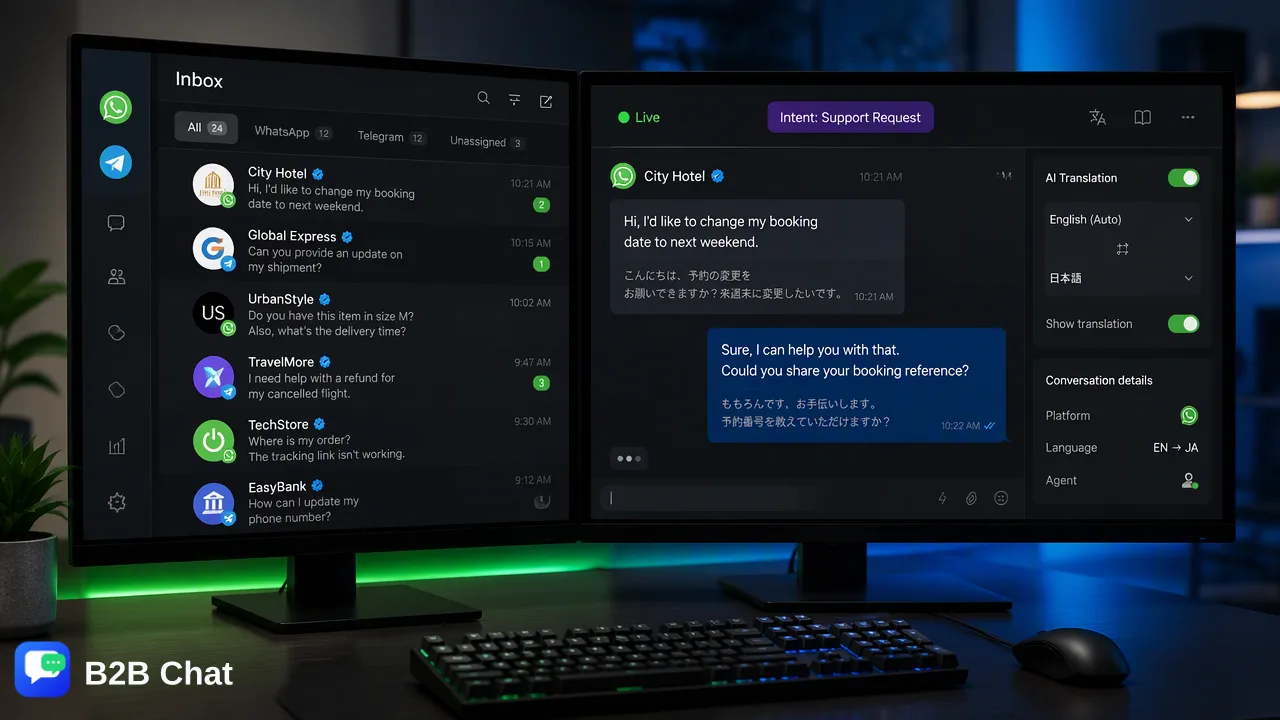
Discover how businesses can evaluate native messaging app business features across platforms like WhatsApp, Telegram, and LINE, and combine them with centralized workspaces and AI-driven support.
Evaluating native messaging app business features requires assessing how platform-specific tools—such as verified business profiles, automated greetings, and interactive menus—align with customer support and outbound communication workflows. To maximize their utility across global channels like WhatsApp, Telegram, and LINE, organizations frequently pair native platform capabilities with a centralized desktop workspace. Combining multi-account aggregation with context-aware AI translation and automated first-line response assistance helps support teams maintain continuous conversation history, reduce manual application switching, and scale cross-border operations effectively.
The Evolution of Messaging Apps into Business Ecosystems
Social messaging applications have evolved from basic interpersonal chat utilities into structured business ecosystems. Platforms such as WhatsApp, Telegram, and LINE now provide native capabilities that support commercial communication, marketing outreach, and service delivery directly inside conversation threads. Modern buyers increasingly prefer interacting with brands through the conversational interfaces they use daily. Native platform features—such as verified business badges, rich media catalogs, automated away messages, and programmable interaction flows—help businesses establish credibility and facilitate direct engagement. However, navigating these ecosystems requires organizations to evaluate which capabilities are best handled directly within the native app environment and which require auxiliary management infrastructure to scale across global markets.
Key Native Features to Prioritize Across Messaging Platforms
When auditing messaging app business features, operational teams should focus on capabilities that directly influence customer trust, response speed, and interaction routing. The most impactful native features typically include:
- Verified Profiles and Official Badges: Establishing authentic identity signals directly in contact headers helps reduce customer skepticism and clarifies organizational ownership. - First-Line Automated Responses: Greeting messages, quick replies, and automated out-of-office notifications provide immediate acknowledgment when inquiries arrive. - Interactive Menus and Mini-Apps: In-chat structural components, such as Telegram bots or LINE rich menus, help guide users through structured service options without directing them out of the chat thread. While these native capabilities create an accessible starting point, relying solely on mobile interfaces poses challenges when teams handle hundreds of conversations daily across multiple operational profiles.
Centralized Workspaces Versus Native App Management
Operating across global regions often requires managing separate phone numbers and accounts tailored to different regions or campaigns. Relying exclusively on native mobile apps or standard web interfaces leads to fragmented conversations, missed notifications, and high cognitive overhead for service teams. A centralized desktop workspace, such as B2B Chat, addresses these limitations by providing a unified client for Windows and macOS. It aggregates WhatsApp, Telegram, and LINE accounts into a consolidated operations hub, supporting multi-login workflows without requiring operators to switch physical devices or juggle browser tabs. | Operational Capability | Native Mobile/Web Management | Centralized Workspace (e.g., B2B Chat) | | :--- | :--- | :--- | | Account Scope | Single account or limited account toggling | Concurrent multi-login across WhatsApp, Telegram, LINE | | Environment | Mobile devices and isolated browser sessions | Downloadable desktop client (Windows and macOS) | | Conversation Context | Siloed by specific application | Aggregated across accounts for centralized team handling | | Language Handling | External manual translation tools | Integrated real-time AI translation (200+ languages) | | Triage & First-Line Support | Manual reply drafting or basic pre-set templates | Intent-aware AI customer service assistance |
Scaling Global Support with AI-Powered Workflows
Expanding into international markets introduces language hurdles and increased message volumes that native app toolsets cannot easily resolve alone. Integrating artificial intelligence into conversational workflows assists operations in two primary areas:
Context-Aware Multilingual Translation
Global customers expect clear communication in their preferred language. Centralized messaging workspaces incorporate automated language detection and contextual translation covering more than 200 languages. Rather than producing rigid, literal word substitutions, context-aware translation adjusts expressions based on the conversational tone and previous turns in the chat, helping agents communicate naturally without language barriers. ### Intent Understanding for First-Line Response Assistance Customer service efficiency depends heavily on how rapidly routine questions are resolved. Smart customer service capabilities interpret customer intent directly from incoming message patterns and chat history. This intent-aware analysis helps automate structured first-line answers or suggests contextual drafts for human agents to review, speeding up resolution workflows while maintaining human oversight.
Best Practices for Integrating Platform-Specific Messaging Tools
To achieve operational consistency across disparate messaging channels, organizations should apply structured operational guidelines:
- Standardize Profile Setup: Configure consistent branding, logos, business descriptions, and support hours across all WhatsApp, Telegram, and LINE profiles. 2. Consolidate Account Access: Use a dedicated desktop client to manage outbound messaging and inbound customer inquiries, minimizing administrative blind spots and fragmented handoffs. 3. Combine Automation with Human Oversight: Deploy AI intent detection to handle repetitive inquiries, while routing nuanced account questions or technical requests directly to experienced representatives. 4. Monitor Workflow Patterns: Review chat volumes and language distributions systematically to allocate team coverage effectively across regional peak hours.
FAQ
Why do organizations pair native messaging features with a centralized workspace?
Native messaging features are bound to individual mobile applications or single accounts. When organizations operate multiple accounts across WhatsApp, Telegram, and LINE, managing them natively creates operational friction and fragmented conversation histories. A centralized desktop workspace supports multi-login management from a single interface, helping teams coordinate inbound requests and maintain context without constant device swapping.
How does context-aware AI translation assist cross-border messaging?
Context-aware AI translation automatically detects customer languages across more than 200 languages and adapts translated phrases to match the ongoing conversation context. This capability helps customer service representatives understand incoming inquiries accurately and draft appropriate responses without relying on external, disconnect-prone copy-paste translation tools.
Can AI-driven customer service replace human support teams in messaging apps?
AI customer service is designed to assist rather than replace human support staff. In practical workflows, AI tools interpret customer intent from message context to handle repetitive first-line inquiries or generate response suggestions. Complex negotiations, sensitive edge cases, and high-value inquiries remain with human operators who review and oversee communication.
Which messaging platforms are commonly integrated into multi-channel business operations?
Global operations commonly focus on WhatsApp, Telegram, and LINE due to their regional adoption patterns across cross-border ecommerce and international markets. Evaluating these channels involves assessing native profile features, group or broadcast support, and how effectively accounts can be managed concurrently inside unified desktop environments.
Learn More
Choose the product information that fits the next step in your workflow.