How to Build a Sales Pipeline Inside Your Shared Messaging Inbox
Learn how to structure a messaging sales pipeline workflow in a shared inbox across WhatsApp, Telegram, and LINE to prioritize leads and track deals.
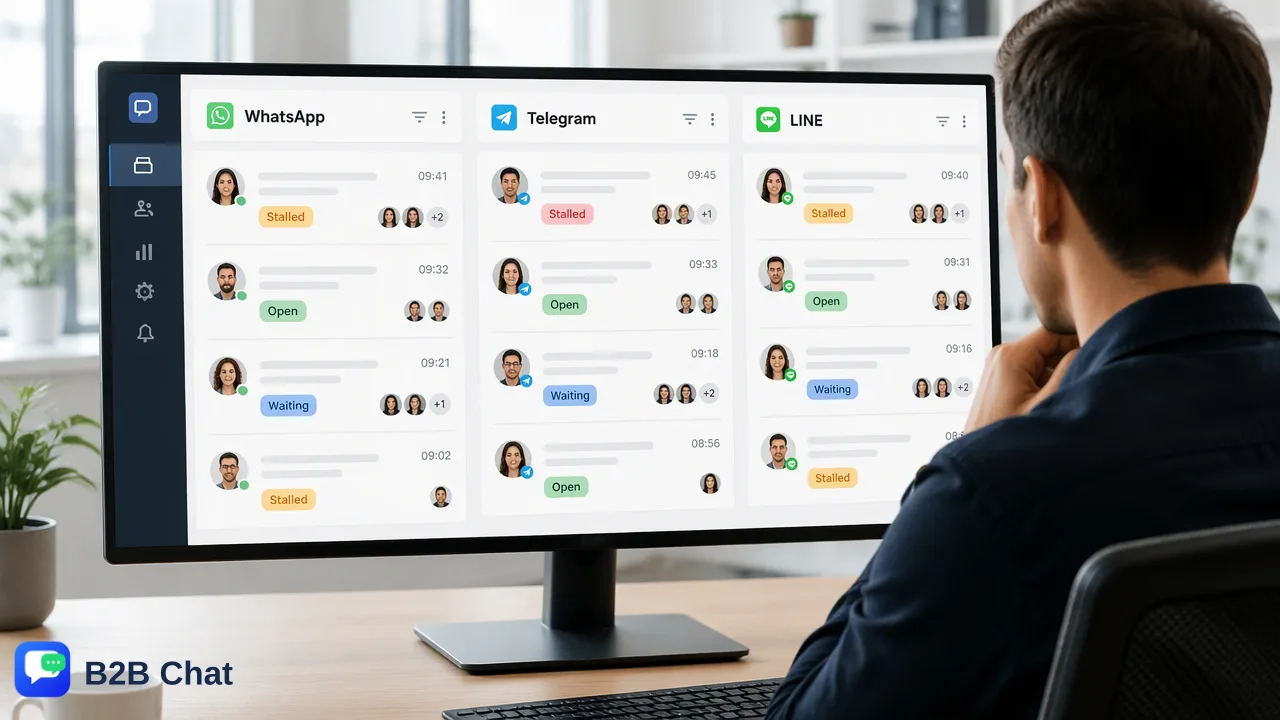
Learn how to build a structured messaging sales pipeline workflow inside a shared inbox across WhatsApp, Telegram, and LINE, covering deal stages, inactivity tracking, shared ownership, and AI-assisted routing.
Building an effective messaging sales pipeline workflow requires moving away from chronological inbox sorting toward a stage-based deal structure. Organizations achieve this by categorizing conversations into defined stages, decoupling internal tracking data from customer-facing chats, establishing clear shared ownership, and utilizing automated inactivity indicators such as stalled or cold tags. Centralizing multiple accounts into a unified workspace and applying AI intent detection further assists teams in maintaining conversation context and prioritizing high-intent opportunities across WhatsApp, Telegram, and LINE.
The Challenge of Inbox-Based Sales: Moving Beyond Recency
Most standard messaging applications arrange inbound conversations chronologically. While recency-based sorting works for casual conversations, it creates operational friction in a high-volume sales environment. When conversations are sorted strictly by the most recent message received, a low-priority notification or casual inquiry pushes high-value opportunities and critical negotiation threads down the queue. This lack of structure frequently leads to deal leakage, missed follow-ups, and uneven workload distribution. When multiple team members manage communications without dedicated pipeline controls, conversations risk being overlooked once they fall below the immediate screen view. A structured messaging sales pipeline workflow addresses this limitation by reorganizing conversations around deal status, revenue potential, and required actions rather than arrival time.
Defining Messaging Pipeline Stages and Decoupling Deal Tracking
To manage sales conversations systematically, organizations must establish clear conversation stages tailored to conversational commerce. Unlike email threads that can span weeks, messaging conversations move quickly and require distinct, action-oriented categories. | Pipeline Stage | Primary Objective | Key Qualification Criteria | | :--- | :--- | :--- | | New Lead | Capture and initial assessment | Contact initiated; identity and core interest recorded | | Qualified | Determine purchase fit and budget | Specific requirements confirmed; commercial criteria verified | | In Negotiation | Finalize commercial terms | Proposal or pricing options sent; active dialogue underway | | Closed / Won | Handoff to fulfillment or onboarding | Commercial agreement confirmed; payment or order logged | | Stalled / Cold | Re-engagement or archive review | Inactivity period reached; pending scheduled follow-up | A critical requirement when implementing these stages is decoupling internal deal tracking from the customer-facing chat feed. When sales reps rely on chat text itself to track deal variables, information gets buried under incoming messages. Maintaining dedicated internal status fields, contact tags, and private notes allows representatives to record deal stages, product requirements, and priority flags without cluttering the client interface.
Implementing Shared Ownership and Inactivity Automation
High-velocity messaging channels require shared accountability. In traditional single-user setups, conversations remain trapped on individual devices or personal app instances, creating bottlenecks when an agent is offline or reassigned. Shared ownership protocols resolve this by ensuring any authorized team member can access conversation history, review contextual notes, and continue an active negotiation seamlessly. Alongside shared access, automated inactivity monitoring keeps pipeline stages accurate. If a prospective buyer stops responding after receiving product details, the conversation should not remain in an active negotiation state indefinitely. Implementing automated status updates—such as applying a "Stalled" tag after a defined period of silence—helps teams quickly filter for stalled conversations and execute targeted re-engagement messages before the opportunity goes cold.
Centralizing Multi-Account Channels and AI Workflows
Global organizations frequently operate across multiple channels and regional markets, deploying multiple WhatsApp, Telegram, and LINE accounts for distinct campaigns or territories. B2B Chat provides a downloadable client for Windows and macOS that connects and operates multiple messaging accounts within a single workspace, eliminating the need to toggle between separate browser windows or physical devices. Within this unified environment, AI capabilities support pipeline throughput at scale:
- Intent Understanding: AI customer service features interpret intent from conversation context and incoming inquiries, assisting with automated first-line responses and initial lead sorting. * Context-Aware Translation: For international sales pipelines, AI translation automatically detects and translates messages across 200+ languages, adjusting translation phrasing based on conversation context so representatives can conduct negotiations without language barriers. * Operational Governance: By consolidating account management and applying standardized tagging across all connected profiles, management teams maintain visibility into lead distribution and team performance across regions.
FAQ
How can teams organize messaging leads without a standalone CRM?
Teams can organize messaging leads directly within a shared messaging inbox by establishing standardized pipeline tags, defining explicit conversation stages, and decoupling internal deal notes from outbound messages. This enables reps to track account statuses, prioritize high-value prospects, and review follow-up timelines directly where customer communications occur.
What is the benefit of separating internal deal tracking from the chat interface?
Decoupling internal deal tracking from the chat interface prevents customer-facing communication channels from becoming cluttered with operational notes. It allows team members to record qualification criteria, budget notes, deal values, and handoff instructions in dedicated metadata fields, ensuring that internal coordination remains private and organized.
How does AI assist in qualifying leads inside a messaging workspace?
AI customer service features interpret incoming message context and customer intent to assist first-line responses. By analyzing conversational context, AI tools help teams categorize inquiry types, determine lead readiness, and route inbound chats to the appropriate representative without requiring manual sorting of every inbound message.
Learn More
Choose the product information that fits the next step in your workflow.