How to Manage and Merge Duplicate Contacts in Your Shared Messaging Inbox
Discover best practices for identifying and merging duplicate contacts across messaging channels to maintain unified customer records and streamline operations.
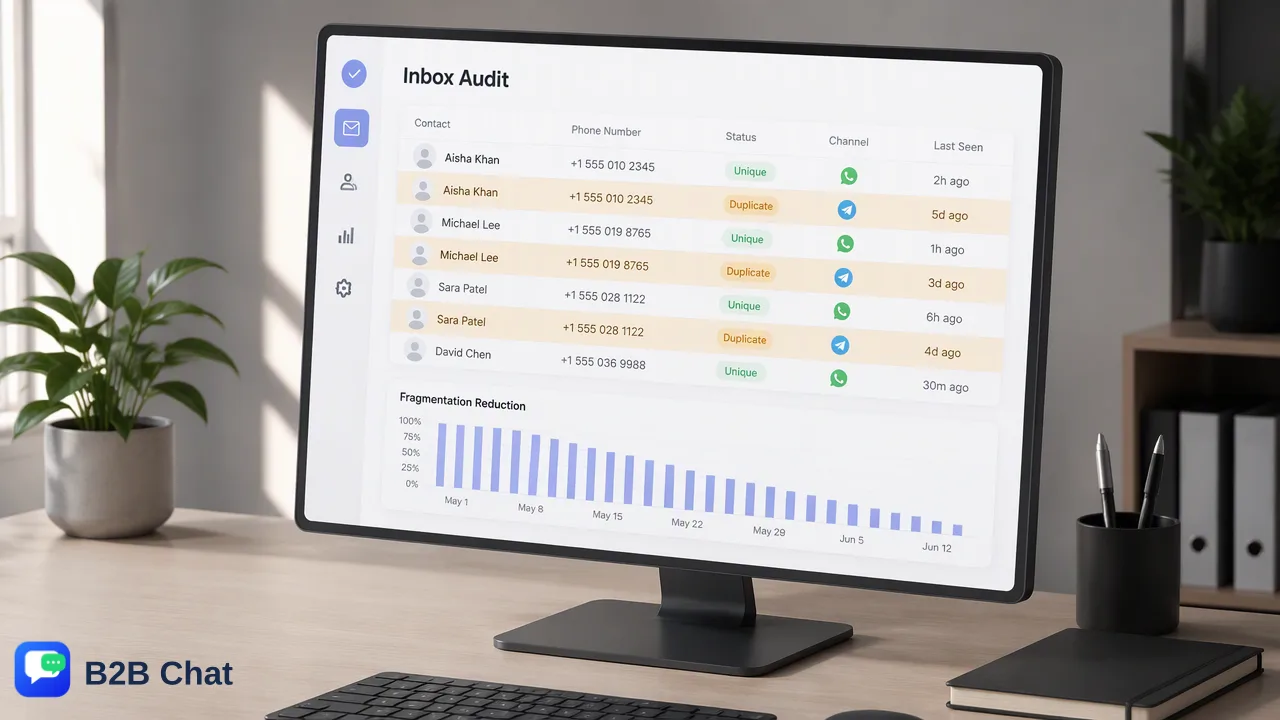
Learn how managing and merging duplicate contacts across WhatsApp, Telegram, and LINE consolidates conversation history, supports agent productivity, and mitigates spam risks.
Managing and merging duplicate contacts in a shared messaging inbox resolves conversation fragmentation that occurs when customers contact an organization across distinct channels such as WhatsApp, Telegram, or LINE. Consolidating separate records into a single profile unites customer interaction history, supports agent coordination, and mitigates the risk of sending repetitive, unsolicited messages across multiple platforms. Effective contact management requires centralizing communication channels into a unified workspace, systematically identifying matching customer identifiers, and preserving critical conversation context during the profile merge.
The Impact of Duplicate Contacts on Messaging Operations
In modern customer-service and social-messaging workflows, customers frequently move between different messaging platforms depending on convenience, device availability, or regional habits. A customer might submit an initial inquiry through a WhatsApp account, seek status updates over Telegram, and interact with marketing announcements on LINE. When these interactions enter disconnected tools or unlinked inboxes, each entry point establishes a standalone profile. This profile fragmentation generates tangible operational friction:
- Fragmented interaction history: Important context—such as ongoing support issues, previous order numbers, or specific customer requests—remains trapped in separate threads, forcing agents to ask repetitive qualifying questions. - Redundant agent effort: Multiple agents may simultaneously handle separate inquiries from the same customer without realizing they are addressing the same underlying issue, increasing operational overhead. - Inconsistent communication: Different agents reviewing partial histories may provide contradictory answers, undermining customer confidence. - Heightened spam risk: When marketing or operational broadcasts run across multiple account lists, the same customer may receive identical promotional broadcasts across different channels. Repetitive messaging can prompt recipients to submit spam reports or block business messaging accounts.
Identifying Duplicates in a Multi-Channel Environment
Establishing effective shared messaging inbox contact management begins with aggregating distinct messaging accounts into a single workspace. Managing multiple WhatsApp, Telegram, and LINE accounts from a centralized desktop client enables teams to view incoming customer interactions across channels in one place. Once multi-account access is centralized, teams can identify matching profiles using cross-referencing criteria. The table below outlines common identifiers used to spot duplicates across messaging channels:
| Identifier Type | Verification Focus | Matching Consideration |
|---|---|---|
| Phone Number | E.164-formatted numeric string | Primary match key across WhatsApp and mobile-linked accounts |
| Username / Handle | Platform-specific usernames (e.g., Telegram) | Secondary identifier; requires confirmation against other data points |
| Customer Metadata | Shared email, order ID, or loyalty account | Contextual identifier linked through customer conversation records |
| Because different platforms expose distinct user identifiers—such as phone numbers on WhatsApp versus optional usernames on Telegram—teams should use conversation details and shared transaction references to verify identity before initiating a profile merge. |
Best Practices for Merging Contact Profiles
Merging two contact profiles requires systematic rules to ensure historical context remains intact while eliminating redundant records. When executing a merge, teams should establish which contact profile serves as the primary master record and determine how attributes are reconciled. Key practices for merging contact profiles include:
- Establish a Primary Anchor Record: Select the contact profile that contains the most verified identifier or highest transaction volume as the primary record. For global messaging workflows, a profile anchored by a verified mobile number often provides the most stable primary key. 2. Consolidate Timeline and Conversation History: Ensure the merging mechanism unifies chat logs from both profiles into a single chronological timeline. Retaining all historical exchanges ensures that context-aware tools, including AI-assisted first-line response systems, can interpret ongoing customer intent accurately. 3. Resolve Conflicting Contact Fields: When secondary fields such as display names, language preferences, or notes differ, prioritize the most recently updated entry or combine distinct notes into a centralized profile overview. 4. Preserve Multi-Channel Handles: The consolidated record must retain the routing identifiers for each merged platform (such as the specific WhatsApp phone number and Telegram user handle) so future inbound messages automatically map to the unified record.
Maintaining Data Hygiene for Long-Term Efficiency
Profile merging should not be treated as a one-time cleanup task. To prevent ongoing fragmentation, organizations should implement ongoing data-hygiene routines within their shared messaging workflow. - Standardize Agent Protocol: Train customer support and outbound marketing teams to verify existing contact records whenever a customer provides alternate contact details during a conversation. - Periodic Inbox Audits: Conduct regular reviews of newly created contacts across connected WhatsApp, Telegram, and LINE accounts to catch unlinked duplicate profiles before outbound campaigns launch. - Leverage Unified Desktop Environments: Operating multiple communication channels within a dedicated multi-login client allows support operators to quickly scan across active conversations, reducing the likelihood of creating orphan contacts across fragmented browser tabs or separate devices.
FAQ
Why do duplicate contacts appear in shared inboxes?
Duplicate records typically emerge when a single customer interacts with a business across different messaging platforms—such as starting an inquiry on WhatsApp and following up via Telegram—or reaches out to different business accounts across regions. Without unified contact aggregation, each platform identifier generates an isolated contact record.
How does merging contacts support agent productivity?
Merging contacts creates a single historical timeline of previous inquiries, purchases, and requests. This consolidation reduces redundant agent research, prevents multiple team members from answering the same customer simultaneously, and provides clear conversation context across support and sales interactions.
What operational risks arise from keeping duplicate messaging profiles?
Fragmented profiles obscure customer context, leading to inconsistent responses, disjointed handoffs, and repeated questions. In outbound messaging or broadcasts, duplicate profiles can result in identical messages being dispatched to the same individual across several channels, increasing the likelihood that customers flag communications as spam.
How can teams retain conversation history when merging profiles?
Teams should configure their shared workspace to preserve historical message threads from each aggregated channel under a unified primary profile. Preserving conversation context ensures that both human agents and automated first-line response systems retain visibility into previous exchanges.
Learn More
Choose the product information that fits the next step in your workflow.