Telegram for Business: A Strategic Guide to Secure Customer Support
Build an efficient telegram customer support strategy with centralized multi-account management, persistent chat context, and AI assistance.
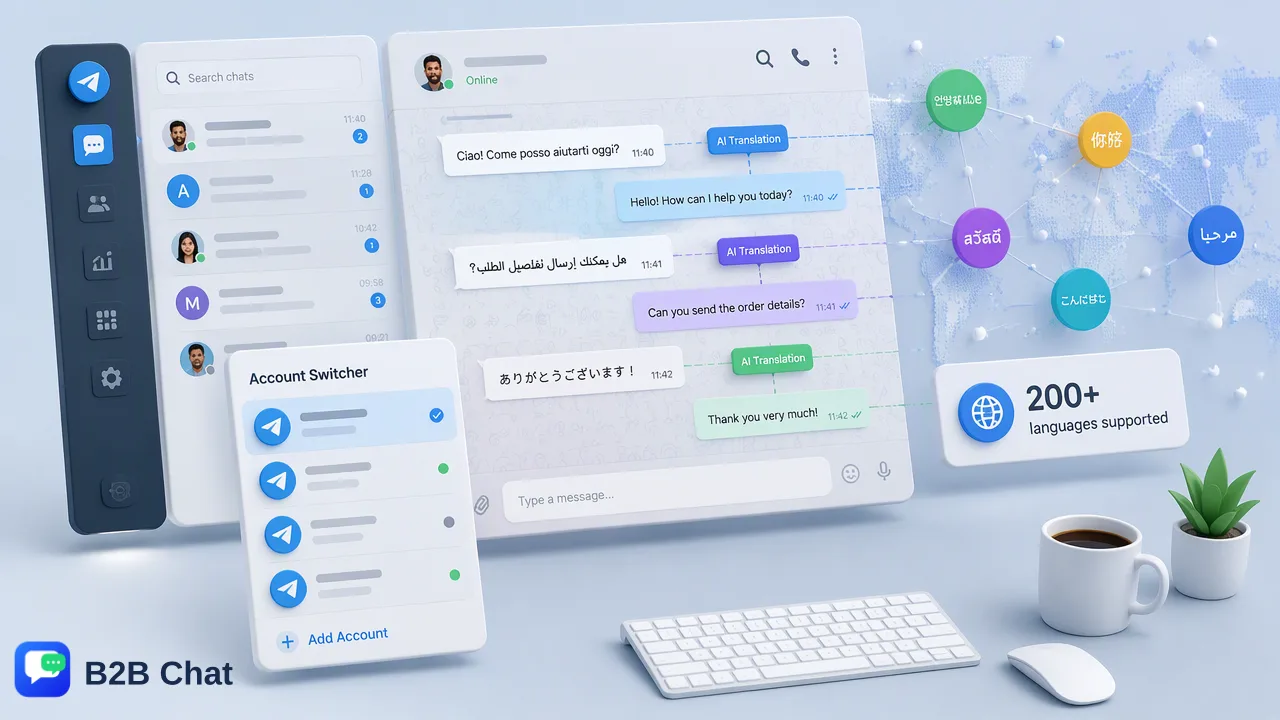
Explore how businesses deploy an effective telegram customer support strategy using centralized multi-account workspaces, persistent conversation history, and context-aware AI tools.
A scalable telegram customer support strategy relies on combining Telegram's privacy-oriented messaging architecture with centralized multi-account management and AI-assisted workflows. By replacing disjointed email chains with persistent chat history and real-time messaging, organizations can streamline inquiry resolution. Centralizing multiple Telegram accounts into a unified desktop workspace helps distributed teams coordinate customer care, maintain conversation context across sessions, and leverage contextual AI translation and automated intent understanding without losing human oversight.
The Strategic Value of Telegram in Customer Support
Modern support operations require immediacy, context preservation, and reliable privacy. While traditional support channels such as email often result in fragmented threads, delayed responses, and lost attachments, Telegram provides a streamlined, cloud-synchronized messaging environment. Its privacy-first architecture builds customer trust, especially for privacy-conscious users and cross-border commercial relationships. From an operational standpoint, Telegram's persistent chat history changes how recurring issues are addressed. Because messages and media remain synchronized in the cloud across sessions, customers do not need to restate background details every time a new support interaction begins. Support agents can immediately review the historical timeline, identify recurring patterns, and provide targeted assistance. This continuous record provides teams with a reliable basis for managing complex, multi-stage inquiries without relying on disconnected ticketing exports.
Centralizing Operations: Managing Multiple Accounts
As organizations expand their reach, support operations frequently require handling separate Telegram accounts across distinct regional markets, business units, or brand divisions. Relying on separate physical mobile devices or repeated web-session logins introduces significant operational friction, leading to delayed replies and fragmented context. | Operational Challenge | Standalone App Approach | Centralized Multi-Account Workspace | | :--- | :--- | :--- | | Account Access | Frequent login/logout on mobile devices | Unified multi-login inside a desktop workspace | | Message Visibility | Isolated to individual phone screens | Consolidated in a team-accessible interface | | Multi-Device Sync | Limited concurrent desktop sessions | Synchronized access across Windows and macOS clients | | Operational Risk | Scattered conversation context | Single source of truth for support interactions | Using a centralized workspace like B2B Chat supports multi-account management from a single desktop client available on Windows and macOS. Support operators connect and manage multiple Telegram accounts in one environment, reducing tool switching and helping teams maintain a unified view of customer conversations across all assigned lines.
Scaling Support with AI-Assisted Workflows
Serving an international user base requires addressing high inquiry volumes across diverse languages without compromising accuracy. Integrating AI capabilities directly into the messaging workflow helps teams handle initial volume while keeping human agents firmly in control of complex decisions. B2B Chat provides AI translation covering more than 200 languages. Rather than producing rigid word-for-word substitutions, the system automatically detects incoming languages and adjusts translation phrasing based on the active conversation context. This helps agents comprehend customer intent quickly and craft context-sensitive replies. Additionally, Smart Customer Service features interpret customer intent from incoming messages and surrounding context to assist automated first-line responses. By parsing common questions and drafting structured replies, automated systems help triage incoming demand during peak periods. Human agents can then review, refine, and finalize responses, maintaining a balance between operational speed and conversational quality.
Best Practices for Professional Telegram Support
Deploying Telegram as a primary support channel requires structured operating procedures to protect brand reputation and customer data:
- Establish Structured Escalation Paths: While AI-assisted first-line responses help manage common informational queries, complex billing inquiries or sensitive technical problems require clear escalation rules to transfer conversations to experienced human specialists. 2. Maintain Human Oversight Over AI Automation: Automated responses should serve as operational assistance rather than an unchecked substitute for customer service representatives. Regularly review automated transcripts to ensure phrasing matches organizational brand guidelines. 3. Centralize Inboxes to Prevent Information Silos: Avoid assigning customer contacts to individual personal devices. Operating through an aggregated desktop workspace ensures conversations remain accessible to the team even when individual staff members rotate shifts or change roles. 4. Respect Platform Boundaries: Telegram enables direct communication, but customer trust depends on non-intrusive practices. Limit outbound messages to direct support follow-ups or explicit service notifications rather than unsolicited promotional broadcasts.
FAQ
Why do organizations adopt Telegram over standard email for customer support?
Organizations adopt Telegram because its privacy-focused infrastructure and persistent chat history offer direct, synchronous communication. Unlike email threads that can fragment context across separate replies and spam filters, Telegram retains an unbroken conversation timeline accessible across multiple devices.
How can teams manage multiple Telegram support accounts from a single place?
Teams manage multiple accounts by utilizing dedicated client workspaces like B2B Chat on Windows and macOS. This setup aggregates multiple Telegram accounts into a single interface, supporting multi-login workflows so support agents can monitor diverse inquiry streams without constant device switching.
How does AI translation assist in handling multi-lingual Telegram inquiries?
AI translation automatically identifies incoming customer languages across more than 200 languages and adapts expressions according to conversation context. This supports frontline agents in reviewing, understanding, and addressing international inquiries without relying on separate manual translation tools.
What role does persistent chat history play in resolving support tickets?
Persistent chat history maintains a continuous record of previous issues, customer preferences, and previous guidance. When a customer reaches out again, agents review earlier messages in the same thread, which reduces repetitive questions and helps accelerate issue triage.
Learn More
Choose the product information that fits the next step in your workflow.