The Unified Messaging Framework: How to Centralize Customer Conversations Across All Channels
Learn how a unified messaging workspace centralizes WhatsApp, Telegram, and LINE to reduce app switching and support international customer operations.
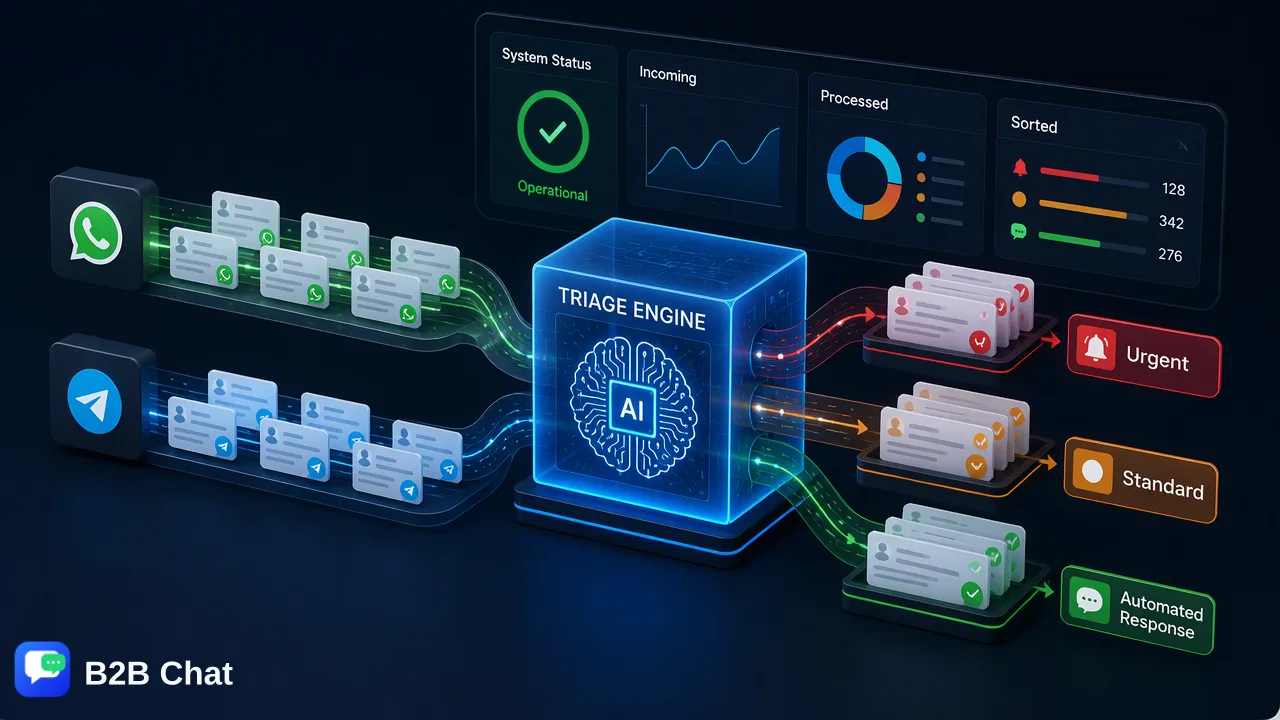
A practical operational guide on implementing a unified messaging workspace across WhatsApp, Telegram, and LINE to reduce app switching, centralize conversation records, and support cross-border communication.
A unified messaging framework centralizes dispersed communication channels—such as WhatsApp, Telegram, and LINE—into a single workspace. By aggregating multiple accounts and platforms into one desktop environment, organizations reduce the operational friction of toggling between standalone apps, maintain a unified conversation context across team members, and utilize integrated AI assistance for first-line triage and multilingual translation.
The Operational Friction of Dispersed Messaging Channels
Managing customer communications across multiple separate applications introduces distinct operational hurdles for customer-service and global-growth teams. When operators must alternate between independent interfaces for WhatsApp, Telegram, and LINE, team attention is divided, leading to administrative overhead and delayed responses. Context switching creates significant hidden costs. Agents navigating between different browser tabs, mobile devices, and desktop applications frequently lose track of conversation history. When customer records and dialogue threads are fragmented across distinct platforms, team members lack a single, reliable point of reference. This fragmentation can result in contradictory answers, repeated questions, and inconsistent service delivery. Furthermore, isolated communication channels complicate managerial oversight. Without centralized visibility, evaluating response times, monitoring queue volumes, and distributing inbound workloads across team members requires manual aggregation, pulling resources away from core service workflows.
Core Architecture of a Unified Messaging Workspace
A unified messaging framework transitions organizations away from isolated chat tools toward an aggregated operational model. Rather than running independent mobile or web sessions, teams connect multiple accounts into a single, downloadable client designed for desktop platforms like Windows and macOS. Within this architecture, multi-login capabilities allow teams to operate several accounts simultaneously across WhatsApp, Telegram, and LINE. Consolidating these streams into a common interface standardizes inbound message handling, message dispatching, and interaction history. | Capability Area | Disconnected Messaging Apps | Unified Messaging Workspace | | :--- | :--- | :--- | | Account Management | Multiple standalone web sessions and devices | Multi-account aggregation in a single desktop client | | Channel Scope | Isolated tabs for WhatsApp, Telegram, and LINE | Centralized view spanning all supported platforms | | Conversation History | Fragmented across individual apps and accounts | Consolidated, searchable historical interaction context | | Operator Workload | High friction from continuous window toggling | Streamlined triage inside a single operating environment | Aggregating accounts into a standardized workspace supports continuity. When conversation histories reside in one shared environment, team members can review prior interactions regardless of which specific channel the customer used previously, preserving vital context.
Assisting First-Line Workflows with Context-Aware AI
High-volume customer communication across global markets introduces two recurring operational bottlenecks: language barriers and initial message triage. A modern unified workspace addresses these challenges by integrating specialized AI translation and customer-service automation directly into the conversation stream. In cross-border environments, manual translation through third-party websites disrupts agent workflows and strips away nuance. Integrated AI translation automatically detects incoming customer languages across more than 200 languages. By interpreting the ongoing conversation context, the translation tool adjusts phrasing appropriately, assisting agents in drafting accurate, natural replies directly inside the chat window. For message triage, AI customer-service tools evaluate customer intent using incoming message text and previous context to assist with automated first-line responses. Rather than replacing human support staff, these tools handle routine initial inquiries, provide suggested answers, and gather preliminary information. Human operators remain central to the workflow, reviewing suggestions and stepping in for complex discussions or sensitive operational escalations.
Best Practices for Team Accountability and Handoffs
Transitioning to a shared messaging environment requires clear operational boundaries to maintain accountability and support smooth collaboration across shifts. Organizations operating in a unified workspace benefit from establishing concrete handoff protocols. When an inquiry requires escalation or shift coverage changes, operators should document notes directly alongside the conversation thread. Because the workspace preserves full message history across connected WhatsApp, Telegram, and LINE accounts, incoming operators can immediately review previous exchanges without asking the customer to repeat details. Key practices for managing a centralized messaging environment include:
- Define Explicit Channel Ownership: Designate specific team members or squads to monitor designated aggregated accounts, avoiding duplicate responses. - Establish First-Line Review Standards: When deploying automated first-line AI assistance, implement routine human review to verify suggested responses against organizational guidelines. - Standardize Internal Handoffs: Require departing agents to summarize unresolved inquiries within the workspace context before transferring active dialogues. - Maintain Consolidated Records: Avoid conducting parallel, undocumented discussions outside the unified client to ensure the shared conversation history remains accurate.
FAQ
Why is a unified messaging framework important for cross-border operations?
Cross-border operations frequently interact with customers across diverse regional platforms, including WhatsApp, Telegram, and LINE. Operating these channels in disconnected interfaces fractures context and slows response cycles. A unified workspace consolidates these channels into one interface, supporting smoother handoffs and language translation across 200+ languages.
How does a centralized workspace assist customer response workflows?
Consolidating accounts into a single downloadable client removes the need to switch windows or devices to track incoming messages. It provides team members with a searchable conversation view, helps maintain continuity during agent handoffs, and allows automated tools to assist with first-line replies based on contextual message intent.
How can AI tools support multilingual customer communication?
Context-aware AI translation automatically detects incoming languages and translates text across more than 200 languages. Because phrasing adjusts according to conversational context, operators can understand customer inquiries and review suggested responses without relying on external copy-paste translation tools.
Learn More
Choose the product information that fits the next step in your workflow.