Scaling Retail Support: A Workflow Framework for Automating WhatsApp Inquiries
Discover how retail teams scale customer support using WhatsApp automation, unified multi-account workspaces, and AI first-line triage.
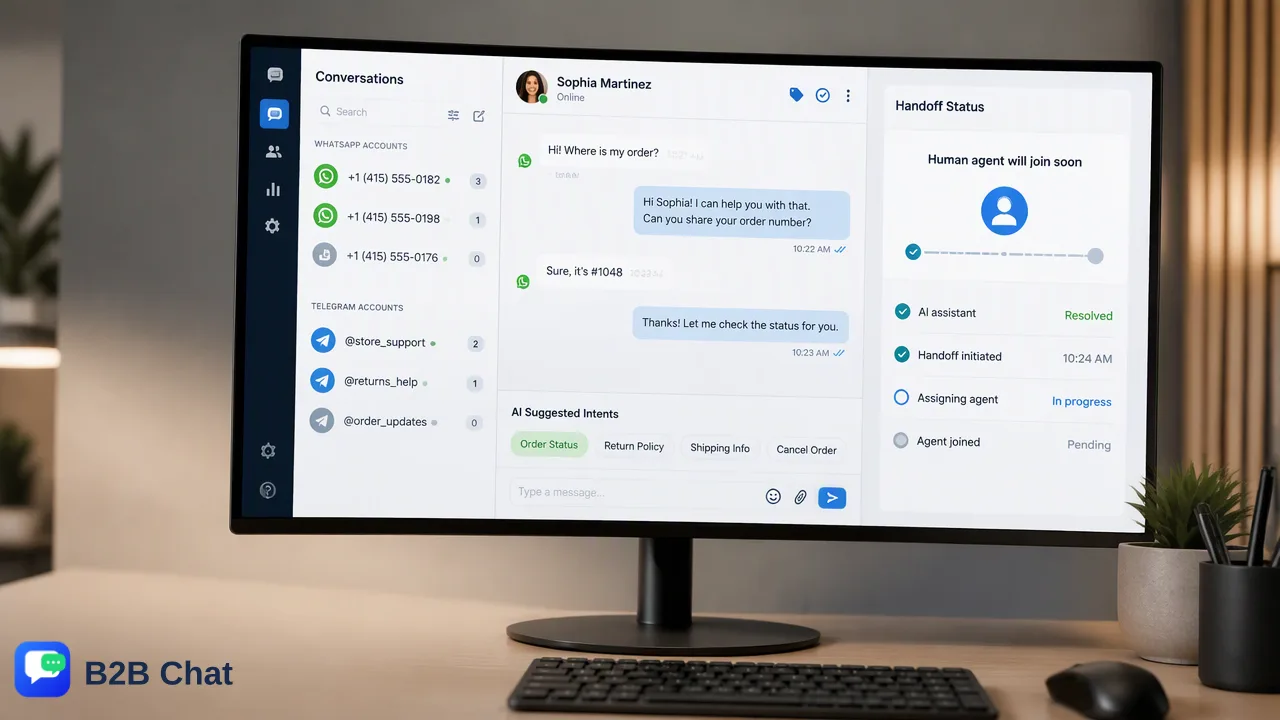
A practical operational framework for retail teams scaling customer support through WhatsApp automation, multi-account centralization, and AI-assisted workflows with human oversight.
Retail teams scale support operations by centralizing fragmented messaging channels into a unified desktop workspace and deploying context-aware AI automation for first-line inquiries. This operational framework allows retail organizations to automatically understand customer intent from message context, handle repetitive fulfillment questions, and preserve unified conversation histories across accounts. Pairing automated first-line responses with structured human-in-the-loop oversight expands team capacity without sacrificing service quality for complex customer cases.
The Operational Bottlenecks of Manual Messaging
For growing retail and cross-border ecommerce brands, direct social messaging has become a primary channel for customer communication. However, managing high-volume customer inquiries through standard mobile apps or unlinked web sessions creates severe operational friction. Manual messaging workflows present distinct operational challenges:
- Fragmented Device Logins: Support teams juggling separate physical phones or multiple web sessions face communication silos, making it difficult to distribute inquiry loads evenly. * Disjointed Conversation Context: When individual agents manage separate accounts independently, conversation histories remain siloed. Customer context is lost during shift handoffs or escalations. * Slow Turnaround During Spikes: Seasonal sales, fulfillment delays, and promotional launches create surges of routine questions regarding tracking numbers and shipping timelines that overwhelm human staff. Attempting to scale support simply by hiring more agents to answer repetitive manual chats leads to escalating overhead and inconsistent customer experiences.
Centralizing Operations with a Unified Desktop Workspace
A core foundation for scaling messaging support is moving away from scattered mobile sessions toward a centralized desktop client. Retail organizations operating across international channels often handle conversations across WhatsApp, Telegram, and LINE concurrently. Using a dedicated workspace on Windows or macOS, teams aggregate multiple messaging accounts into a single environment. This setup allows customer support teams to:
- Consolidate Multi-Account Logins: Support representatives manage multiple brand accounts or regional lines simultaneously within one operational interface. 2. Maintain Persistent Conversation History: Every incoming inquiry is cataloged with prior customer context, giving agents instant visibility into earlier interactions and purchase inquiries. 3. Eliminate Constant Tool Switching: Centralizing accounts reduces the operational friction of toggling across disconnected apps, supporting faster triage and structured agent assignments.
Deploying Context-Aware AI for First-Line Inquiries
Centralization creates the structure for support operations, but workflow automation provides the leverage needed to handle rising volume. Instead of forcing human agents to answer identical questions, retail teams configure automated flows to triage inbound conversations. AI customer service systems interpret incoming customer intent by evaluating the broader conversation context rather than matching basic keywords. This context-aware understanding helps organizations automate routine touchpoints:
- Onboarding and Information Gathering: When a prospective buyer initiates contact, automated prompts collect essential details—such as order numbers, issue categories, or product names—before a human agent steps in. * Fulfillment and Tracking Notifications: Standard requests concerning dispatch dates, tracking links, and delivery estimates are answered automatically, resolving high-frequency status checks instantly. * Context-Driven First-Line Answers: For frequently asked policies, such as sizing charts or warranty coverage, the system provides immediate guidance directly in the chat thread. Automating routine fulfillment notifications significantly reduces the volume of repetitive tickets that human agents must manually process.
Balancing Automation with Human-in-the-Loop Oversight
While automated flows excel at processing routine operational questions, scaling retail support requires clear human-in-the-loop boundaries. Over-automating conversations can frustrate shoppers who experience nuanced product issues or complex delivery disputes. An effective support framework treats AI automation as first-line support rather than an absolute human replacement. The table below illustrates how responsibilities divide across the retail support lifecycle:
| Interaction Type | Automated Workflow Role | Human Agent Role |
|---|---|---|
| Order Status & Tracking | Delivers immediate tracking links and fulfillment updates | Investigates lost packages, courier claims, and shipping exceptions |
| Initial Onboarding | Collects customer identification and order reference details | Reviews specialized sizing, styling, or custom quote requests |
| Policy Inquiries | Presents return windows and warranty documentation | Evaluates condition disputes, refund approvals, and discretionary credits |
| Complex Complaints | Acknowledges receipt and tags inquiry priority | Conducts detailed investigation and negotiates resolution |
| When an inquiry exceeds predefined automated parameters, the system routes the conversation to an assigned agent within the unified workspace. Because earlier context and data collection remain recorded in the chat thread, human agents can resolve complex customer needs without requiring the buyer to repeat information. |
FAQ
How does a unified inbox improve retail support efficiency?
A unified inbox aggregates incoming conversations from multiple WhatsApp, Telegram, or LINE accounts into a single interface. Support agents manage concurrent conversations from one workspace without switching between separate browser tabs or physical mobile devices, maintaining full customer interaction history in one view.
Can AI customer service understand customer intent without rigid keyword scripts?
Yes. Modern AI customer service workflows interpret incoming customer inquiries using the surrounding conversation context rather than relying solely on exact keyword matches. This capability helps the system classify shopper requests—such as return policies or delivery questions—and generate relevant first-line replies.
How do retail organizations structure handoffs between AI workflows and human agents?
Teams set routing rules where automated workflows handle standard fulfillment inquiries, data collection, and routine onboarding questions. When an inquiry involves order disputes, exceptions, or high-touch escalation, the conversation passes to a human agent within the unified client, preserving the prior chat context.
Learn More
Choose the product information that fits the next step in your workflow.