Scaling E-Commerce Operations: When to Upgrade from the WhatsApp Business App to the API
Learn when to upgrade from the WhatsApp Business app to the API and centralized messaging workspaces to scale customer support and automation.
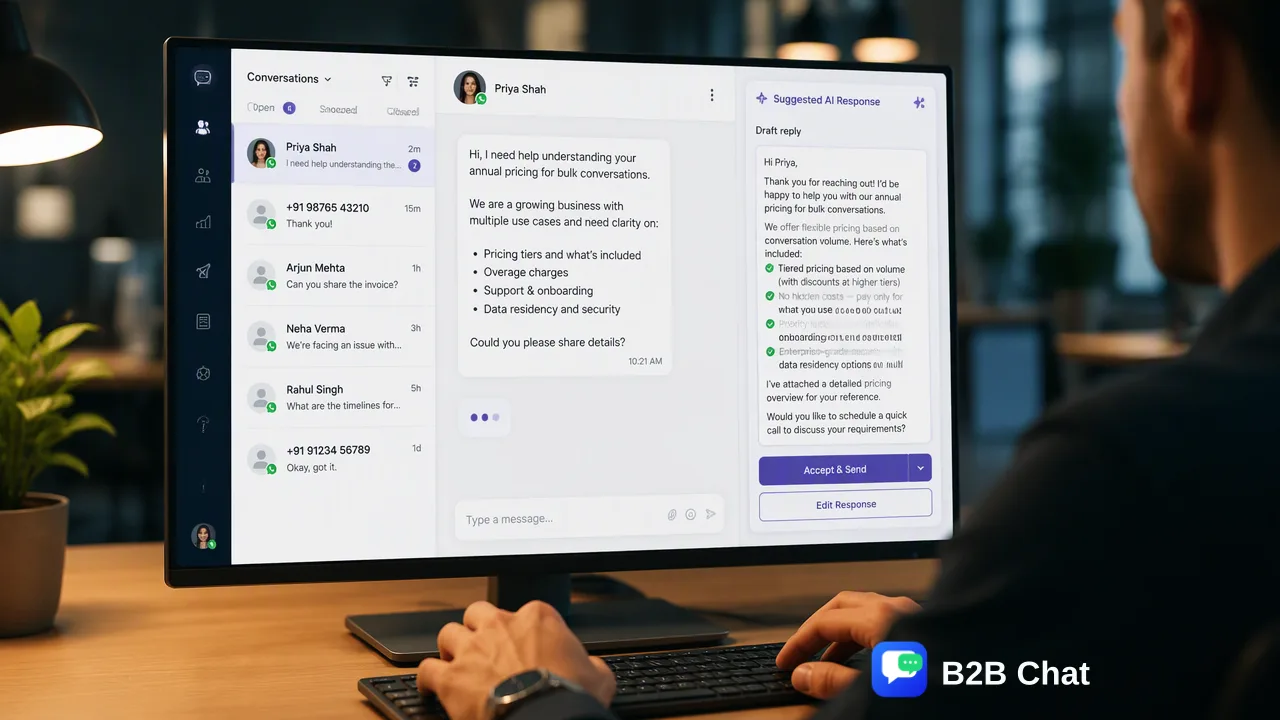
Growing e-commerce stores eventually outgrow the standalone WhatsApp Business app. This guide outlines the key operational inflection points, the transition to API-driven messaging infrastructure, and how centralized workspaces support team-wide collaboration and AI-assisted workflows.
E-commerce stores reach an operational inflection point when manual messaging workflows inside the free WhatsApp Business app begin creating support bottlenecks. The standalone app is designed primarily for solo operators, meaning single-device limitations and manual response handling quickly strain growing teams. Upgrading to the WhatsApp Business API and centralized messaging infrastructure helps growing businesses aggregate customer communications across multiple accounts, connect back-office systems, and deploy contextual AI tools for first-line inquiry assistance.
The Operational Limits of the Standalone WhatsApp Business App
The free WhatsApp Business app offers an accessible starting point for boutique merchants and solo entrepreneurs who handle direct communication from a mobile device. However, as an e-commerce catalog expands and transaction counts rise, the operational boundaries of a standalone mobile app become apparent. Because the standard application ties conversations to limited device sessions, multiple team members cannot easily collaborate on inbound inquiries in real time. Order tracking requests, inventory questions, and return inquiries quickly accumulate in a single inbox, forcing support leads into manual triaging. When response cycles depend entirely on manual typing on handheld devices, peak sales periods routinely lead to delayed responses, missed customer touchpoints, and fragmented internal accountability.
Recognizing the Inflection Point for E-Commerce Teams
Determining when to move from the standard application to an enterprise-grade messaging architecture depends on concrete operational signals rather than arbitrary calendar milestones. For most online retail brands, the shift becomes urgent when support inquiries outpace the speed of manual replies. Key inflection indicators include:
- Inquiry Volume Spikes: Daily incoming message volume consistently exceeds what one or two dedicated support staff can manage manually within reasonable response windows. * Multi-Account Fragmentation: The business operates distinct regional brands, regional storefronts, or departmental lines across separate WhatsApp, Telegram, or LINE numbers without a centralized dashboard. * Disconnected Order Data: Support representatives must continuously leave the messaging app to query order status, tracking numbers, or inventory systems, increasing handling time per customer. * Compliance and Communication Windows: Teams struggle to manage customer service windows and structured notification templates required for commercial communications at scale.
Operational Benefits of API-Integrated Messaging Workspaces
Moving to the WhatsApp Business API or an aggregated messaging workspace provides structural infrastructure for cross-border e-commerce operations. Rather than keeping customer conversations isolated on staff mobile phones, API-driven workflows centralize messaging into professional operations consoles. Workspaces like B2B Chat support multi-login aggregation across WhatsApp, Telegram, and LINE accounts within a single downloadable client available for Windows and macOS. This architectural shift provides several operational advantages:
| Capability | Standalone Business App | API-Integrated Messaging Workspace |
|---|---|---|
| Team Access | Limited device sessions; individual phone dependent | Multi-operator client access with centralized conversation logs |
| Account Management | Single phone number per app installation | Multi-account aggregation across WhatsApp, Telegram, and LINE |
| Automation Scope | Basic away messages and manual quick replies | Programmatic notification templates, routing, and contextual AI |
| Operating Environment | Mobile-first, single-operator interface | Dedicated desktop client for Windows and macOS environments |
| By unifying multiple communication channels into a centralized workspace, operations managers maintain visibility over team workloads while giving support agents the context needed to process inquiries systematically. |
Scaling Support with Contextual AI and Multilingual Translation
High-volume retail operations require more than shared inboxes; they also benefit from automated first-line assistance that reduces routine repetitive inquiries. Integrating AI-assisted customer service within the messaging workspace helps manage common queries regarding shipping, order confirmation, and product specifications. Modern AI customer service modules interpret customer intent directly from message context and ongoing conversation history. Rather than relying on rigid, keyword-matching bots that frustrate shoppers, contextual AI models assist by drafting relevant first-line answers or providing instant resolutions to predictable questions. Human agents can then review, modify, or take over complex inquiries without disrupting the customer interaction. For international e-commerce merchants, language barriers present an additional scaling friction. Integrated AI translation tools automatically detect and translate incoming messages across more than 200 languages. Because these tools adjust translation expression based on conversational context, agents can communicate with international buyers accurately without requiring dedicated localized support teams in every target market.
FAQ
What are the primary operational differences between the WhatsApp Business app and the API?
The WhatsApp Business app is a standalone mobile application tailored for single-user or small-scale communication with manual reply handling. In contrast, the WhatsApp Business API serves as a programmatic interface intended for multi-user support environments, automated order notifications, and integration with customer management systems.
How do centralized messaging workspaces support growing support teams?
Centralized messaging workspaces help teams manage conversations across multiple WhatsApp, Telegram, or LINE accounts from a unified desktop interface on Windows or macOS. This structure reduces tool switching, supports multi-agent oversight, and maintains conversation context across distributed support operations.
Can AI customer service handle complex customer inquiries independently?
AI customer service tools are designed to assist support teams by interpreting customer intent from incoming messages and conversational context to generate first-line responses. Rather than replacing human agents entirely, they serve as decision-support and drafting mechanisms, with complex or nuanced queries directed to human staff for review.
Learn More
Choose the product information that fits the next step in your workflow.