Upgrading to the WhatsApp Business API: A Zero-Downtime Migration Strategy
Discover how a coexistence strategy and unified workspace support a zero-downtime WhatsApp Business API migration while preserving conversation context.
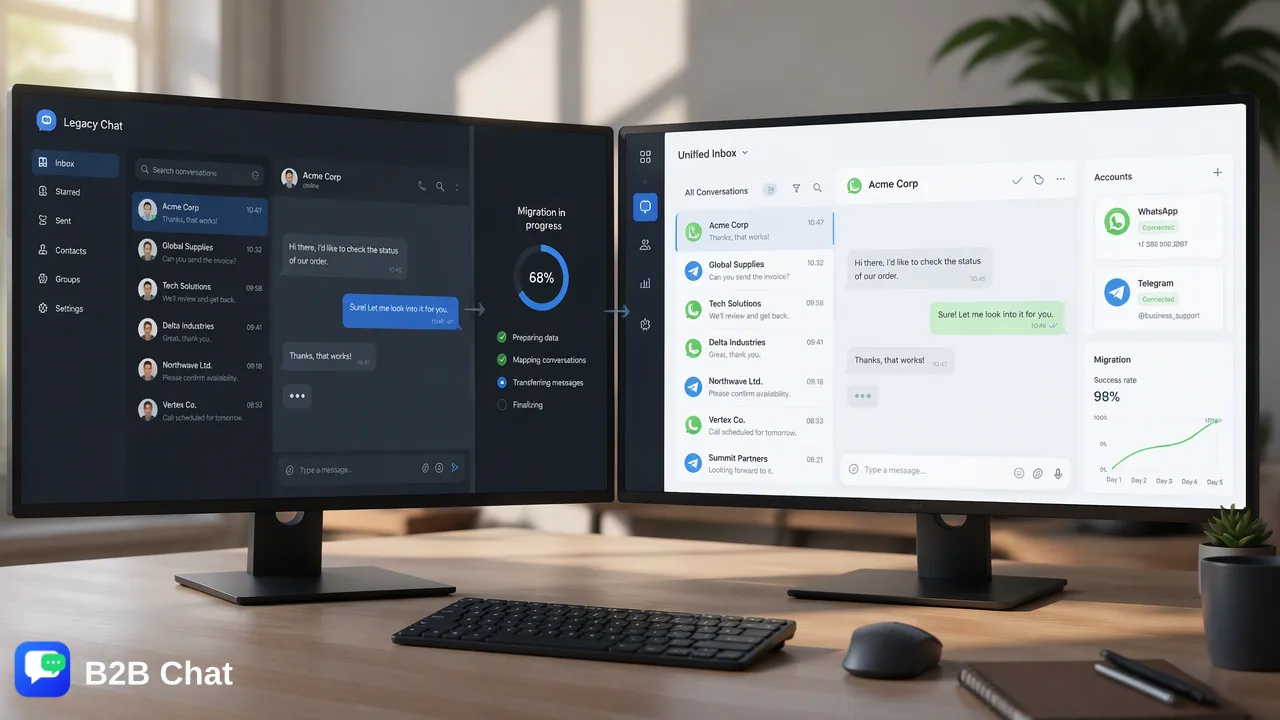
Learn how businesses can manage a zero-downtime WhatsApp Business API migration using coexistence strategies, unified workspaces, and AI-assisted customer communication.
Executing a WhatsApp Business API migration does not require an abrupt cutover that disrupts live customer communication. By adopting a coexistence strategy supported by a unified messaging workspace, organizations can maintain access to existing operational channels while provisioning API infrastructure. This phased transition helps teams preserve customer context, integrate AI-assisted first-line support, and connect multi-channel accounts without experiencing message loss or service interruptions.
The Strategic Shift: App vs. API
Operating customer communication solely through individual phone-based messaging applications creates clear operational bottlenecks as contact volume expands. The standard business application binds conversations to single physical devices or limited browser sessions, restricting collaboration across distributed customer support and growth teams. Transitioning to an enterprise-grade messaging interface provides the structural foundation required for structured team collaboration, CRM integrations, and automated workflows. The operational differences dictate how organizations manage scale, data continuity, and team access:
| Operational Capability | Standard Messaging App | API & Unified Workspace Infrastructure |
|---|---|---|
| Account Management | Single phone instance with limited web sessions | Centralized multi-login across teams and channels |
| Automation Capabilities | Basic greetings and manual quick replies | Intent-based automated first-line assistance |
| System Integration | Standalone mobile storage | Direct support for CRM and operational databases |
| Cross-Platform Handling | Isolated channel interface | Unified inbox for WhatsApp, Telegram, and LINE |
| Recognizing these distinctions helps organizations plan an infrastructure shift that improves team efficiency without compromising day-to-day customer touchpoints. |
Implementing a Zero-Downtime Migration
A traditional hard cutover between communication channels carries substantial operational risks, including dropped customer inquiries, delayed responses, and lost historical context. Organizations can mitigate these vulnerabilities by implementing a phased coexistence model. Coexistence maintains legacy client access while new programmatic endpoints are configured and validated. Operating both environments in parallel provides teams with an active fallback while backend webhooks, staff permissions, and workflow automations undergo end-to-end testing. A unified messaging workspace plays a pivotal role in this phase. Software like B2B Chat delivers downloadable desktop clients for Windows and macOS, supporting account aggregation and multi-login across messaging accounts. Centralizing legacy and transition accounts in a single workspace environment helps teams monitor real-time inbound dialogues, preventing customer messages from slipping through administrative gaps while backend routes switch.
Preserving Context During Transition
Data integrity during a channel migration extends beyond raw text exports; it centers on context preservation. When support operators switch interfaces, losing ongoing conversation sentiment and intent history can frustrate repeat customers and create redundant inquiries. Deploying AI-assisted customer service tools helps maintain this crucial conversational continuity. Advanced systems analyze conversation context and parse customer intent directly from incoming message streams. Rather than relying on rigid, keyword-only scripts, intent-aware systems assist human agents by generating relevant first-line drafts based on the immediate dialogue context. This continuous interpretation of conversational nuance supports support staff during routing cutovers. Customer inquiries can be triaged and addressed smoothly, keeping service benchmarks steady even as operational handoffs shift behind the scenes.
Operational Benefits of the API Workspace
Completing a WhatsApp Business API migration positions customer-facing teams to modernize their broader communication workflows. Beyond core API messaging capabilities, pairing the platform with dedicated workspace software unlocks substantial operational efficiencies across cross-border markets. First, multi-platform aggregation centralizes diverse private-domain touchpoints. B2B Chat supports unified management across WhatsApp, Telegram, and LINE, allowing operators to oversee outbound marketing and inbound service from a single client interface. This consolidation reduces tool switching and simplifies supervision across distinct regional channels. Second, integrated AI translation helps teams engage international customer bases without language barriers. By automatically detecting inbound text and translating across 200+ languages—while adjusting phrasing to fit conversation context—the workspace supports seamless global interactions alongside human review. Combining multi-account oversight with contextual AI assistance provides a sustainable foundation for international business growth.
FAQ
Can teams migrate to the WhatsApp Business API without losing chat history?
Yes. A phased migration strategy pairs existing front-line accounts with unified workspace tools. By centralizing platform account-presence signals across downloadable desktop clients before decommissioning legacy devices, organizations preserve customer context and maintain historical continuity across support conversations.
What does a coexistence strategy mean in a WhatsApp migration?
Coexistence refers to an operating model where legacy messaging instances and new API workflows operate concurrently during migration. This staging period gives teams time to configure routing, test intent-based response systems, and verify incoming message traffic before fully transitioning communication endpoints.
How does a unified workspace assist during the transition phase?
A unified workspace aggregates multiple messaging accounts across WhatsApp, Telegram, and LINE into one desktop application. This setup reduces tool switching for operators, centralizes incoming inquiries, and helps support teams manage conversations side-by-side during structural infrastructure shifts.
How can AI tools support service continuity during system migration?
Context-aware AI customer service tools interpret customer intent from conversation history and incoming inquiries. These systems assist staff with first-line replies and automatic language translation, which helps maintain response quality even while underlying routing channels are updated.
Learn More
Choose the product information that fits the next step in your workflow.