Bridging the Gap: How to Integrate Messaging Channels with Your CRM for Seamless Lead Management
Connect chat channels to your CRM. Learn how WhatsApp CRM integration and unified workspaces help teams manage leads and maintain conversation context.
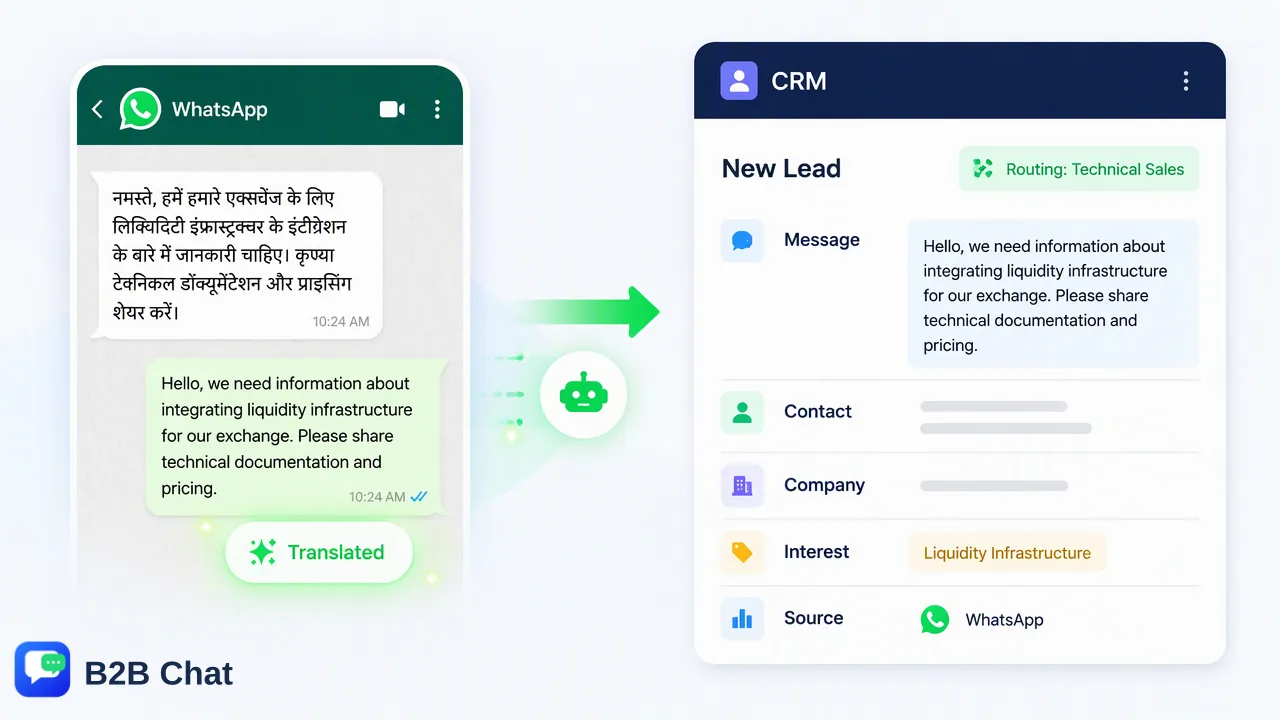
Learn how connecting WhatsApp, Telegram, and LINE with your CRM infrastructure reduces messaging silos, preserves context during handoffs, and streamlines global lead management.
Effective lead management requires connecting messaging channels directly to a CRM so every customer interaction is logged, assigned, and tracked. When sales and support representatives conduct discussions in separate mobile applications, customer context remains fragmented. Implementing a WhatsApp CRM integration alongside a unified workspace for channels such as Telegram and LINE helps organizations reduce messaging data silos, support automated lead capture, and preserve conversation history across team handoffs.
The Hidden Cost of Messaging Silos in Lead Management
In modern customer acquisition, prospective clients increasingly reach out through social chat applications rather than web forms or email. While direct messaging offers immediacy, it frequently introduces operational friction when managed through disconnected mobile devices or isolated desktop apps. These unlinked communication channels—often called side chats—operate outside the organization's central database, creating messaging data silos. When customer communications bypass the CRM, businesses face tangible operational challenges:
- Fragmented Timelines: Inbound inquiries, product queries, and qualification details remain stored on individual employee phones, denying colleagues a unified view of the customer journey. * Manual Data Entry Burden: Team members must manually copy chat summaries, contact numbers, and follow-up tasks into the CRM, leading to missing records and delayed response cycles. * Accountability Gaps: Without centralized message assignment, inbound leads can easily be overlooked or simultaneously contacted by multiple team members. * Disrupted Handoffs: When a lead transitions from marketing to sales or tier-one support to a specialist, context is often lost, requiring the customer to repeat information.
WhatsApp CRM Integration and Workspace Centralization
Bridging messaging channels with enterprise systems requires consolidating conversational endpoints into a structured environment. Implementing a WhatsApp CRM integration strategy begins with centralizing incoming traffic from core chat networks. B2B Chat supports WhatsApp, Telegram, and LINE account aggregation to help global teams manage customer communication in a unified workspace. Rather than managing accounts across disparate browser tabs or individual phones, teams can operate multiple messaging accounts through a downloadable desktop client available for Windows and macOS. This architectural shift aggregates customer communications into a coherent operational layer before feeding records into core CRM databases. | Operational Factor | Disconnected Chat Operations | CRM-Integrated Messaging Workspace | | :--- | :--- | :--- | | Account Oversight | Fragmented across individual employee devices | Centralized multi-account aggregation in one client | | Channel Coverage | Siloed WhatsApp, Telegram, and LINE apps | Unified dashboard across primary messaging networks | | Interaction Logging | Manual note-taking or unrecorded chats | Continuous conversation history available for review | | Handoff Efficiency | Context lost during team transfers | Complete message threads accessible to assigned agents | Centralizing these touchpoints supports consistent tracking of contact timelines, giving cross-border ecommerce, private-domain marketing, and client-support units the visibility needed to manage leads systematically.
Automating Lead Capture and Contextual Handoffs
Centralization creates the foundation for operational automation. Once messaging streams converge, automated tools can assist teams with lead categorization and early-stage qualification. AI-assisted customer service tools interpret customer intent from incoming messages and conversational context. By analyzing inbound inquiries, the system can assist automated first-line responses for routine queries, such as pricing catalogs, operational hours, or service categories. This preliminary triage helps route the conversation to the appropriate department while capturing essential qualification metadata. For international businesses, language barriers often complicate lead qualification. Integrated AI translation automatically detects and translates messages across more than 200 languages. Because the translation engine adjusts phrasing based on surrounding conversation context, human operators can interpret subtle customer requirements accurately. When an inquiry is reassigned to a technical account manager or regional representative, the entire translated context remains visible, helping teams preserve continuity and customer trust throughout the handoff.
Best Practices for Account Aggregation and Team Accountability
To maintain high data hygiene and operational discipline across expanding sales channels, organizations should establish clear structural workflows:
- Consolidate Multi-Account Logins: Prioritize workspace infrastructure that accommodates multi-account management. Deploying solutions with open port architecture and support for multiple simultaneous logins helps teams expand regional marketing lines without arbitrary seat or port restrictions. 2. Establish Structured Conversation Routing: Define internal routing rules so incoming chats are assigned immediately to specific team queues. Clear ownership reduces response lag and ensures accountability across customer-facing staff. 3. Preserve Complete Audit Trails: Maintain uninterrupted conversation history within the workspace. Archiving the full message exchange provides a reliable reference for team supervisors and subsequent account managers. 4. Combine Automated Triage with Human Review: Use AI capabilities to assist initial engagement and language translation, while relying on skilled representatives to handle nuanced negotiations, relationship building, and final deal closures.
FAQ
Why is it important to integrate messaging apps with a CRM?
Operating messaging channels in isolation creates data silos where customer details, inquiry history, and qualification notes remain trapped on individual devices. Integrating messaging channels with a CRM helps centralize contact timelines, supports operational transparency, and assists team members in managing follow-ups without manual data entry.
How does AI translation improve lead management for global teams?
Context-aware AI translation detects and translates customer inquiries across more than 200 languages directly within the chat interface. By adjusting translation expressions based on conversation context, it helps distributed teams handle international leads accurately while preserving continuity when transferring conversations between regional agents.
What are the operational benefits of a unified messaging workspace?
A unified workspace aggregates multiple WhatsApp, Telegram, and LINE accounts into a single desktop client. This setup reduces application switching, centralizes message monitoring, and supports multi-account management across marketing and customer service teams.
Learn More
Choose the product information that fits the next step in your workflow.