Scaling WhatsApp Ecommerce: Managing Catalogs and Product Inquiries
Scale WhatsApp ecommerce operations by replacing manual photo sharing with structured catalog workflows, multi-account workspaces, and AI inquiry support.
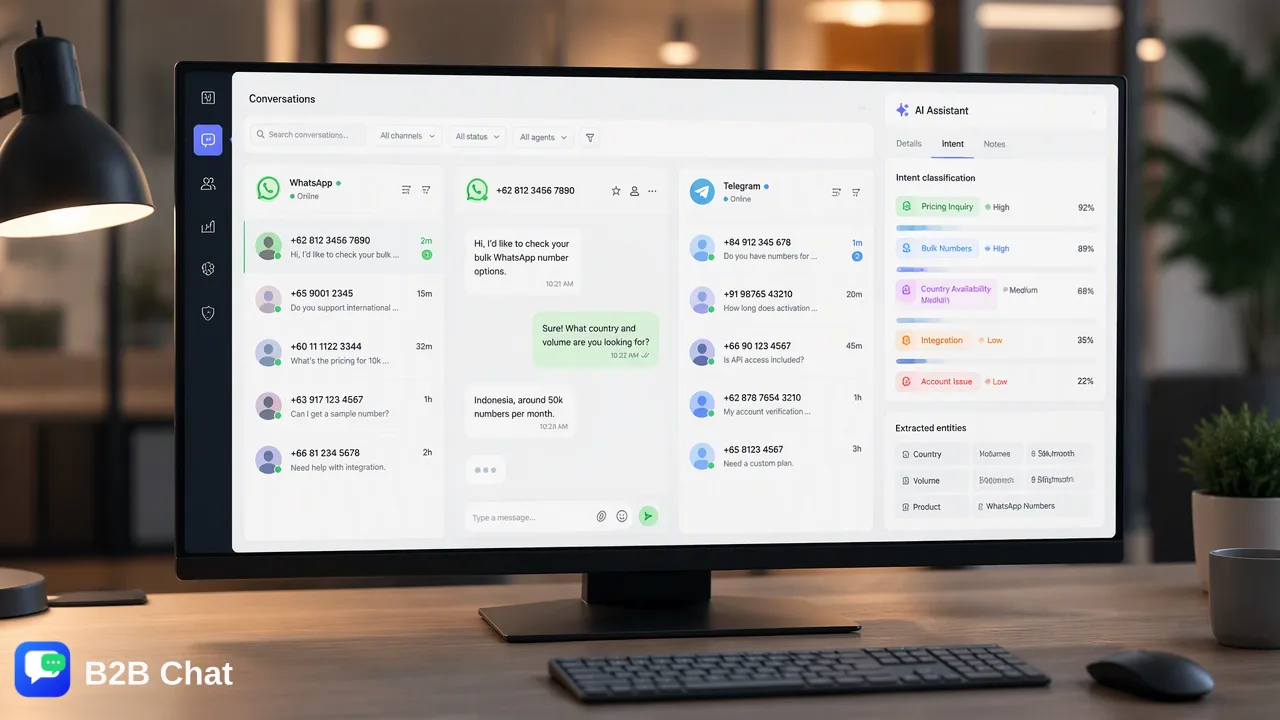
Learn how to scale WhatsApp ecommerce operations by shifting from manual photo-sharing to structured catalog management, centralized messaging, and AI-assisted inquiry workflows.
Scaling WhatsApp ecommerce requires transitioning away from manual photo-sharing toward structured catalog workflows, centralized multi-account management, and context-aware inquiry handling. Managing product inquiries manually across separate mobile devices creates immediate communication bottlenecks as conversation volume grows. By adopting a dedicated messaging workspace, businesses can aggregate incoming conversations across accounts, provide structured product details, and deploy automated first-line AI assistance to interpret customer intent directly from incoming messages.
The Bottlenecks of Manual WhatsApp Ecommerce
Many growing brands launch their conversational sales efforts using basic mobile messaging. While sending product photos and price lists directly from a smartphone works during the early stages of a business, this manual method quickly becomes inefficient as message volume expands. Manual photo-sharing introduces several operational friction points:
- Disorganized inventory presentation: Sending individual product images and informal text descriptions clutters chat histories, making it difficult for prospective buyers to compare variations, sizes, or specifications. * Repetitive inquiries: Support agents find themselves answering the same basic questions regarding stock availability, sizing charts, and payment methods repeatedly throughout the day. * Channel fragmentation: When conversations are split across physical phones or individual team numbers, management loses visibility into response times and lead status. * Inconsistent pricing and descriptions: Without standardized product cards or centralized templates, team members frequently share outdated pricing, obsolete SKU details, or conflicting product descriptions. As transaction volumes rise, these manual patterns strain operations. Response times lengthen, shopper inquiries go unanswered during peak hours, and customer-facing teams spend critical hours managing repetitive chat threads rather than closing high-value inquiries.
Structuring WhatsApp Catalog and Inventory Workflows
Effective whatsapp ecommerce catalog management transforms messaging from an informal chat stream into an organized sales and support channel. Implementing a structured catalog framework allows brands to present products clearly within the messaging ecosystem, creating a frictionless browsing experience for buyers. A structured messaging catalog organizes items into clear categories with standardized photos, official titles, prices, descriptions, and direct product links. When shoppers browse an organized collection inside the app, they can select specific items and share them back into the chat thread to initiate a precise inquiry. | Workflow Dimension | Manual Photo-Sharing | Structured Catalog Management | | :--- | :--- | :--- | | Product Discovery | Unsorted gallery uploads and camera roll pictures | Organized product collections with standardized listings | | Detail Retrieval | Agent manually types dimensions, materials, and prices | Pre-configured cards showing specifications and links | | Inquiry Clarity | Vague references to past photos in long chat histories | Direct SKU-linked inquiries sent straight to the support inbox | | Operational Scaling | Linear staff expansion required for every volume bump | Centralized management handling increased conversation loads | Structuring the presentation of products establishes clear context for every interaction. When a customer attaches a catalog item to their message, support teams and automated systems immediately identify the exact product under discussion, eliminating confusing back-and-forth clarification messages.
Centralizing Operations for Scalability
Operating cross-border commerce or private-domain sales channels often requires multiple messaging accounts dedicated to different marketing campaigns, regional markets, or operational units. Juggling multiple mobile devices or logging in and out of fragmented browser sessions introduces delays and risks missed customer inquiries. B2B Chat provides a customer-service and social-messaging workspace that connects multiple accounts into a single interface. By using account aggregation across WhatsApp, Telegram, and LINE through a downloadable desktop client for Windows and macOS, teams can manage incoming streams of product questions without constant tool switching. Centralizing customer interactions into a unified workspace supports operational oversight across all connected brand accounts. Inbound messages route into a shared operating environment where agents can review ongoing chats, coordinate handoffs, and maintain consistent brand messaging. This unified structure prevents lost conversations and provides operational clarity as transaction volume grows across regional sales lines.
Automating Product Inquiries with AI First-Line Assistance
Even with structured product listings, customers frequently ask detailed questions before placing an order. Common inquiries focus on material specifications, delivery timelines, payment procedures, and care recommendations. Answering these manually around the clock consumes extensive support capacity. Deploying smart customer service automation helps manage inquiry spikes by interpreting intent directly from incoming messages and active conversation context. Instead of relying on rigid, keyword-triggered autoresponders that fail when a user phrases a sentence unusually, context-aware AI evaluates the conversation history to deliver appropriate first-line assistance. This first-line automation workflow operates systematically:
- Intent Understanding: The AI analyzes the incoming chat to determine whether the shopper is asking about product availability, seeking technical specifications, or inquiring about shipping options. 2. Context-Aware Assistance: The system uses the active conversation history and relevant product catalog context to generate a natural, helpful reply. 3. Human Escalation: When a shopper expresses nuanced negotiation intent, requests customized orders, or raises an issue requiring human discretion, the conversation transitions smoothly to support agents for direct review. This collaborative division of labor supports frontline teams by handling high-volume repetitive queries instantly, helping agents focus their attention on complex negotiations and high-touch customer relationships.
Managing Multilingual Inquiries Across Global Markets
Cross-border ecommerce brands frequently receive inquiries in multiple languages. Language barriers can introduce delays that disrupt the customer discovery journey and lead to abandoned chats. To support international commerce, B2B Chat incorporates real-time AI translation covering more than 200 languages. The system automatically detects incoming customer languages and translates inbound messages directly inside the chat window. Agents can read the translated text, compose their response in their native language, and have the system translate the output with expressions adjusted to match conversation context. Integrating automated translation directly within the messaging client supports global expansion without requiring localized, multilingual support teams in every target territory. Product inquiries, sizing questions, and payment instructions are communicated accurately across language boundaries, keeping cross-border buyer journeys smooth and responsive.
FAQ
How does AI customer service handle product-specific questions?
AI customer service evaluates customer intent from incoming text and conversation context to deliver automated first-line replies. When shoppers ask about product specifications, sizing, or general details, the system interprets the inquiry within the active conversation and assists with relevant answers, directing more complex questions to human agents.
Can teams manage multiple WhatsApp business accounts in a single workspace?
Yes. Teams can use account aggregation tools to connect and operate multiple WhatsApp accounts alongside channels like Telegram and LINE within a single downloadable desktop client for Windows and macOS, eliminating the friction of switching between individual devices.
Does automated customer service replace human support agents?
Automated messaging tools are structured to assist human teams rather than replace them. First-line automation addresses repetitive inbound product inquiries and routine questions, which supports human specialists by freeing their capacity to handle complex consultations, negotiations, and post-purchase issues.
Learn More
Choose the product information that fits the next step in your workflow.