How to Build a Structured WhatsApp Sales Follow-Up Workflow
Learn how to build a structured WhatsApp sales follow-up workflow, organize multi-account cadences, and maintain context across conversations.
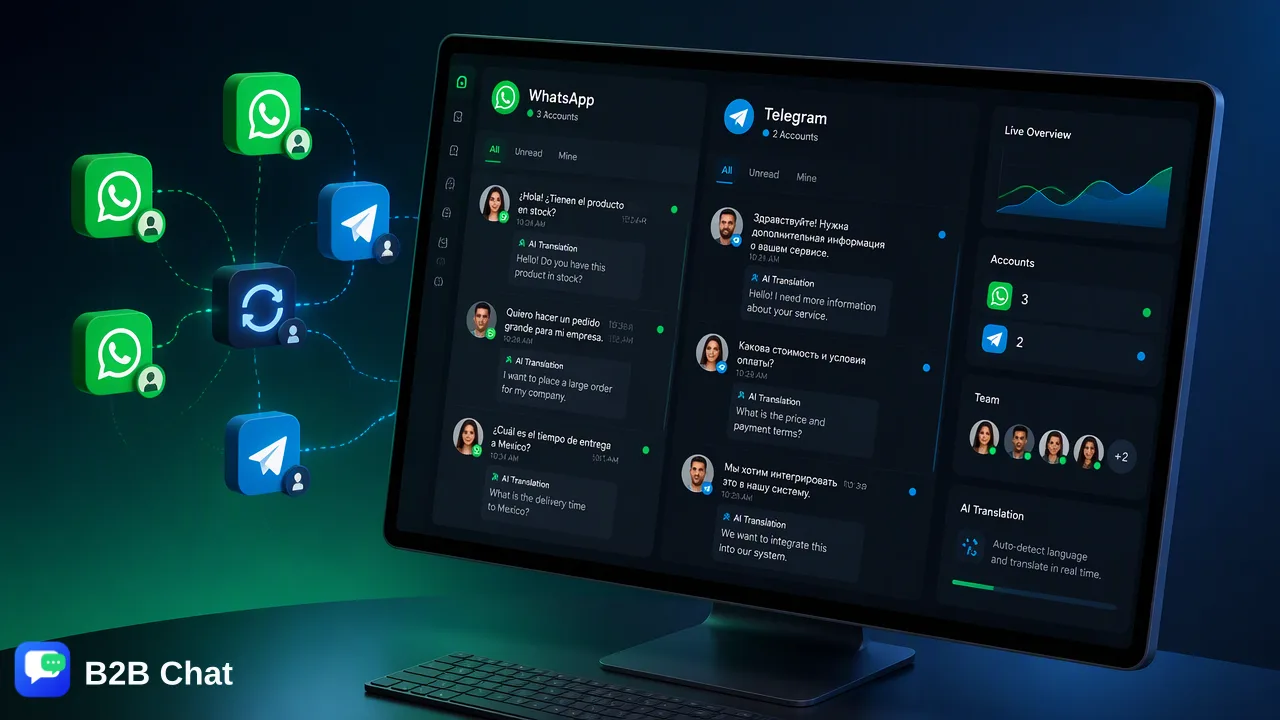
Learn how global sales teams structure WhatsApp follow-ups, establish clear timing cadences, centralize multi-account conversations, and use AI-assisted tools to maintain context.
A structured WhatsApp sales follow-up workflow replaces ad-hoc, memory-based outreach with an organized communication schedule and a centralized operating workspace. By mapping clear follow-up intervals across specific interaction stages, utilizing concise, question-led messages, and centralizing multiple accounts into a shared desktop environment, organizations can maintain conversation context across ongoing prospect discussions without relying on individual mobile devices or fragmented notes.
The Shift from Manual Tracking to Structured Workflows
Relying on memory or informal note-taking to follow up with sales prospects creates blind spots across communication channels. In high-volume messaging environments, representatives frequently juggle dozens of simultaneous chats, resulting in forgotten leads, erratic response timings, and lost conversation history when staff members change devices or roles. A systematic WhatsApp sales follow-up workflow establishes clear rules for when, how, and why a representative touches base with an active prospect. Instead of treating WhatsApp as an informal instant-messaging app, organizations treat it as a disciplined operational channel. Shifting to an organized framework requires moving away from isolated smartphone apps and adopting a centralized workspace capable of aggregating multiple messaging accounts in one place. Centralization ensures that every conversation is logged, visible to the broader organization, and supported by documented outreach steps. This operational clarity helps teams prioritize warm inquiries, balance team capacity, and establish predictable cadences for every lead.
Defining a Strategic Follow-Up Cadence
A predictable cadence prevents prospects from feeling overwhelmed while maintaining momentum during the decision-making cycle. WhatsApp messages carry a personal, direct notification presence, meaning that generic check-ins or excessive messaging can prompt recipients to mute or archive conversations. Establishing intervals based on the prospect's last action supports steady communication:
| Pipeline Stage | Recommended Interval | Workflow Objective | Low-Friction Message Focus |
|---|---|---|---|
| Immediate Post-Demo / Inquiry | Within 2 to 4 hours | Recap key requirements | Confirm delivery of promised materials with a simple receipt check. |
| Proposal Review | 48 hours post-submission | Address initial impressions | Inquire if specific technical or budget questions arose during review. |
| Mid-Cycle Stalled Lead | 5 to 7 business days | Re-engage around specific value | Share a relevant operational update or ask if project timelines shifted. |
| Final Decision Check | 10 to 14 business days | Clarify ongoing interest | Ask directly whether the project remains active or should be paused. |
| Every touchpoint should lower the cognitive friction required to reply. Broad questions like "Do you have any updates?" require significant effort to formulate a status report. In contrast, narrow, closed questions—such as "Did the pricing breakdown align with your team's budget scope?"—invite prompt, one-sentence responses that keep the dialogue moving forward. |
Maintaining Context Across Multi-Account Operations
A primary operational barrier in scaling WhatsApp sales is fragmented context across personal hardware. When sales professionals manage inbound contacts through separate mobile devices, team leads lack visibility into pipeline progress, customer details remain inaccessible to support staff, and context vanishes if an employee departs. Deploying a dedicated downloadable client for Windows or macOS helps businesses overcome hardware isolation. B2B Chat supports the aggregation and simultaneous multi-login of multiple WhatsApp, Telegram, and LINE accounts within a unified desktop environment. This architecture allows organizations to run multiple regional or agent-specific lines simultaneously without forcing team members to rotate physical SIM cards or switch browsers. Within this unified setup, team members review the complete transcript of previous interactions before issuing scheduled follow-ups. Centralized visibility ensures that if an inquiry touches multiple team members—such as a sales representative and a technical solutions consultant—both parties maintain full visibility into shared commitments and past questions.
Leveraging AI for Context and Multilingual Consistency
Scaling structured outreach across international audiences introduces language barriers and message triage challenges. In high-velocity pipelines, delays in understanding incoming replies can derail a carefully timed follow-up sequence. B2B Chat integrates Smart Customer Service and AI Translation directly into the communication workspace to support operational consistency:
- Intent Understanding and First-Line Assistance: The system interprets customer intent from inbound messages and surrounding conversation context. This capability assists automated first-line responses for routine acknowledgments or preliminary qualification questions, ensuring prospects receive timely feedback while sales staff prepare detailed follow-ups. - Context-Aware Translation: For cross-border commerce and international accounts, the platform offers automatic language detection and translation across more than 200 languages. Rather than performing rigid word-by-word substitutions, the translation expression adjusts dynamically based on the context of the conversation, helping global sales representatives communicate naturally with international leads. These automated capabilities act as operational aids rather than replacements for human relationship management. Routine acknowledgments and translation tasks are handled smoothly, while complex commercial negotiations and relationship development remain in the hands of the sales team.
Step-by-Step Implementation Guide
Building an operational follow-up workflow involves systematic alignment across team tooling, schedule definitions, and message templates. 1. Standardize Workspaces: Transition customer-facing representatives from disparate handheld phones to an aggregated desktop client on Windows or macOS. Aggregate platform account-presence signals alongside other social channels like Telegram or LINE to centralize daily inbox monitoring. 2. Categorize the Pipeline: Segment leads by interaction recency and stage—such as initial inquiry, proposal presented, or re-engagement—to assign appropriate cadence intervals. 3. Draft Low-Friction Templates: Create internal message templates that focus on single, clarifying questions. Avoid ambiguous check-ins by framing each message around a specific decision point or shared resource. 4. Incorporate Intent-Aware Support: Configure automated first-line assistance to process incoming inquiries promptly during off-hours, ensuring the system captures prospect intent and maintains the conversation until representatives resume personal engagement. 5. Review Conversation Logs Regularly: Use the unified workspace to periodically audit chat logs, identify dropped conversations, and refine cadence intervals based on typical prospect response cycles.
FAQ
How can teams manage multiple WhatsApp accounts effectively?
Teams can aggregate multiple WhatsApp accounts alongside other channels into a single desktop workspace. Running operations from a centralized downloadable client on Windows or macOS helps sales representatives monitor incoming chats, maintain unified conversation histories, and avoid the operational silos caused by managing leads on separate personal devices.
What is the role of AI in a WhatsApp sales follow-up workflow?
AI assists the follow-up process by analyzing conversation context and interpreting customer intent from incoming inquiries. This supports automated first-line replies for routine queries and provides context-aware translation across global conversations, assisting representatives while preserving human control over nuanced sales negotiations.
How do sales teams keep structured follow-up messages personal?
Teams preserve personalization by referencing specific details from previous exchanges, such as stated project requirements or earlier questions, rather than sending generic check-in blasts. Using intent-aware assistance helps representatives quickly review recent message history before drafting a targeted, single-question follow-up.
Learn More
Choose the product information that fits the next step in your workflow.