How to Choose Customer Service Software for Cross-Border Sales on WhatsApp, Telegram and LINE
A selection checklist for cross-border customer service software: channels, multi-account handling, translation, AI replies, seats, records and billing.
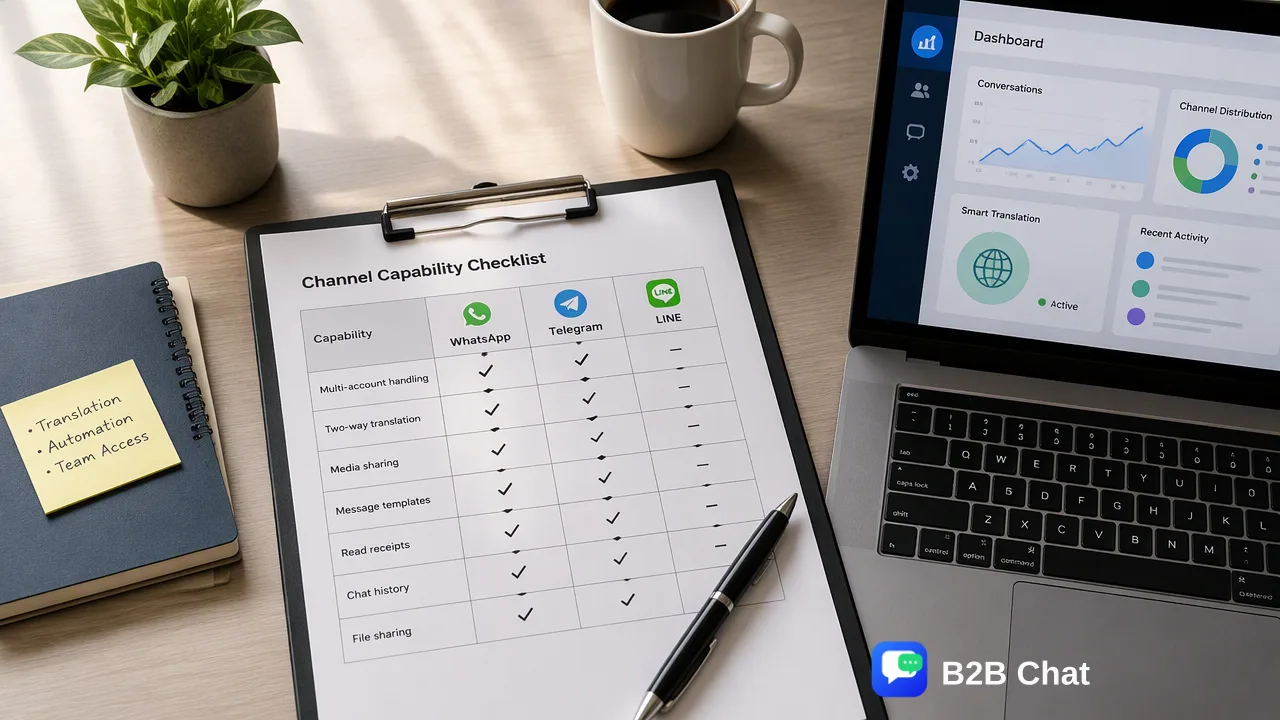
A practical checklist for foreign-trade teams choosing customer service software for messaging-first overseas markets.
The right cross-border customer service software is the one that fits where your buyers actually talk, not the one with the longest feature list. Start with the messaging channels your buyers use, then check multi-account handling, two-way translation, AI first-line replies, seats and customer records, desktop versus web, and how usage is billed. Score each candidate against the same checklist and run a short trial with real conversations before committing.
Start with the channels buyers actually use
Many general helpdesk guides assume email and web chat. Cross-border selling often does not work that way. Buyers in Indonesia, Latin America and other messaging-first markets frequently expect to be reached on WhatsApp, and Telegram or LINE matter in specific regions and communities.
Before comparing vendors, list for each target market:
- the channel buyers use first when they contact a supplier;
- whether they expect replies within minutes or within the day;
- whether the team already has accounts on that channel, and how many.
Then mark each candidate as supporting, partly supporting or not supporting those channels. A tool that lacks your main channel fails the checklist, whatever else it offers. B2B Chat supports exactly WhatsApp, Telegram and LINE, so it only applies when those are your channels.
Check how the software handles many accounts
Teams selling overseas rarely run one number. They run several, by market, product line, marketplace or salesperson. Ask:
- Can all accounts be opened and monitored side by side in one place?
- Is there a limit tied to how many accounts or how long they stay open, and how is it billed?
- Are accounts owned by the company, so conversation history stays when a salesperson leaves?
- Does the tool depend on the staff member's phone being nearby?
A multi-account desktop client addresses this directly. B2B Chat aggregates and multi-opens WhatsApp, Telegram and LINE accounts in one Windows or macOS client, and its ports are currently open and not billed by count or usage time. That is a current commercial position, not a promise of a literally unlimited number of accounts, so test your real account count in the trial. The WhatsApp multi-account page covers the setup in more detail.
Translation: one-way reading versus two-way replies
Language is the central cross-border problem. Distinguish two capabilities that vendors often blur together.
- Reading translation shows incoming messages in your language.
- Two-way translation also translates your reply into the buyer's language before sending.
For daily selling you need the second. Also ask about automatic language detection, coverage of the languages in your markets, whether translation adapts to conversation context and industry terms, and whether your team can review the text before it goes out. No translation tool is perfectly accurate, so favor a workflow that makes review easy over a vendor that claims flawless output. B2B Chat's Smart Translation detects language automatically and translates both ways across 200+ languages, with wording tuned to context and industry terms.
AI first-line replies and what stays with staff
Time zones are the other cross-border problem. A team in China answers buyers in Jakarta or Mexico City at awkward hours. An AI agent can cover routine questions in between.
Evaluate it on these points:
- How is the knowledge base prepared and updated?
- Does it use multi-turn context, or does each message stand alone?
- Can many conversations be handled in parallel?
- What happens to questions it cannot answer, and how do staff see them?
- Is usage metered in a way you can forecast?
Be skeptical of any claim that AI replaces the support team. It is first-line assistance for routine questions. B2B Chat's Smart Service is positioned that way, and the AI customer service page explains how it works with a knowledge base.
Seats, customer records and management controls
Software that works for one person can fall apart for a team. Check the management side:
- Seats and roles: can several staff share accounts with defined access?
- Customer records: are conversations and customer details stored for the business, not on personal phones?
- Reply library: can the team share approved answers, including multilingual versions?
- Controls: are there sensitive-word controls, warm-up rules for new numbers, and activity statistics?
- Handover: when a salesperson leaves, can the account and its history move to someone else?
B2B Chat's CRM console includes account and device management, activation codes, customer records, support seats, a reply library, keyword auto-replies, warm-up policies and sensitive-word controls. These controls do not override messaging-platform rules or guarantee against account restrictions, so write your own policy on consent and pacing.
Desktop client or web app, and how usage is billed
Decide whether the sessions should run in a browser or in an installed client. A desktop client keeps long-running sessions stable and suits staff who spend all day in chat, but it requires installing software on work computers. B2B Chat runs messaging sessions in a free-to-download Windows and macOS client; its web consoles manage accounts, activation codes, replies and billing, and there is no browser-only messaging client. The download page lists the client.
For billing, ask whether you pay per seat, per account, per month or per use. The way costs scale should match how your team grows. B2B Chat bills prepaid per request for its two AI capabilities, translation and Smart Service, rather than per port or per month, and current rates are on its pricing page. Whatever you evaluate, ask for the full cost of the setup you plan to run, not the entry price.
A scoring template and trial plan
Turn the checklist into a table and score each candidate from 0 to 2 per row.
| Criterion | Question to answer | Score |
|---|---|---|
| Channels | Are all buyer channels supported? | 0 to 2 |
| Multi-account | Can all accounts run together without a count limit that blocks you? | 0 to 2 |
| Two-way translation | Are replies translated, with review? | 0 to 2 |
| AI first line | Is there a knowledge base and a staff handoff? | 0 to 2 |
| Seats and records | Do records stay with the company? | 0 to 2 |
| Client type | Does desktop or web fit how staff work? | 0 to 2 |
| Billing | Does cost scale predictably with your usage? | 0 to 2 |
Then run a one-week trial with real conversations from two markets. Track time spent per reply, number of questions handed to staff, translation corrections and any handover problems. The scores plus the trial notes make the decision defensible to whoever approves the purchase.
FAQ
How can teams compare cross-border customer service software fairly?
Teams can write one checklist covering channels, multi-account handling, two-way translation, AI first-line replies, seats and records, client type and billing, score every candidate against it, and test each with real conversations from the same markets.
Which messaging channels does B2B Chat support?
B2B Chat supports WhatsApp, Telegram and LINE for account aggregation and multi-open. Other messaging platforms are not supported, so it fits only teams whose buyers use these three channels.
Is two-way translation necessary for cross-border support?
Reading translation helps with understanding, but daily selling also needs replies translated into the buyer's language. Two-way translation with a review step covers both, though no translation tool is perfectly accurate.
Can AI customer service replace a cross-border support team?
No. AI is useful for routine, repeated questions and for covering time-zone gaps, while complaints, quotes and exceptions should stay with staff. A good tool makes that handoff visible.
Learn More
Choose the product information that fits the next step in your workflow.