Translating LINE Chats with Japanese, Thai and Taiwanese Buyers
LINE chat translation for sales reps: why copy-paste breaks context, how two-way automatic translation helps, and what a human should still check.
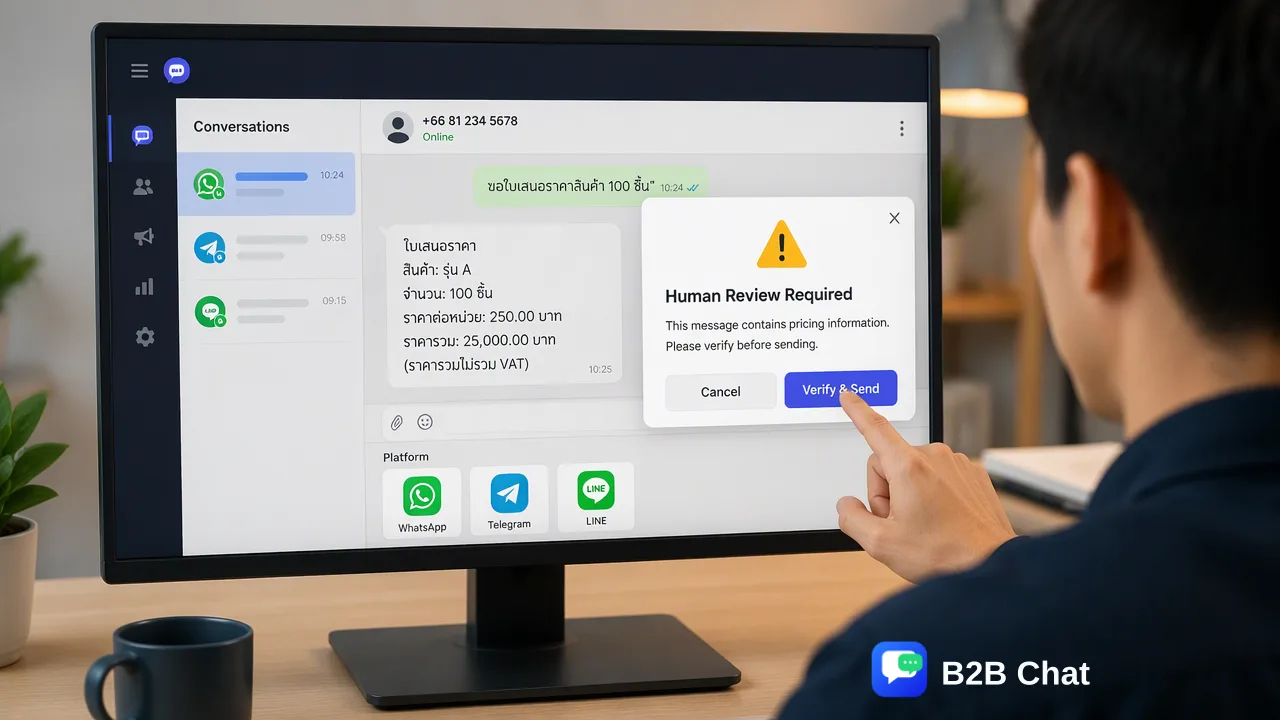
Shows how a sales rep can answer LINE buyers in Japanese, Thai and Traditional Chinese with two-way automatic translation, and where human review still matters.
LINE chat translation works best when it happens inside the conversation: incoming messages are translated for the rep, and the rep's reply is translated back before sending. Copy-pasting into a separate translator loses context and slows every reply. A desktop client with automatic language detection and two-way translation keeps Japanese, Thai and Traditional Chinese threads readable, while a human still checks prices, delivery dates and promises before they are sent.
What goes wrong with copy-paste translation
Picture a rep answering LINE buyers in three languages. The usual workflow is to copy the buyer's message into a translator, read it, write a reply, translate it, and paste it back. It breaks down in predictable ways:
- Lost context. Each message is translated alone, so references like "that one" or "the earlier price" lose meaning.
- Inconsistent terms. The same product name or unit comes out differently from one message to the next.
- Slow replies. Four steps per message adds up across dozens of chats.
- Wrong register. Japanese and Thai have levels of politeness that a literal translation can flatten or overshoot.
- Errors in pasting. A reply meant for one buyer is pasted into another buyer's thread.
How two-way automatic translation keeps the thread in context
In B2B Chat, Smart Translation detects the language of each incoming message automatically and translates between the buyer's language and the rep's, in both directions, across 200+ languages. Wording is adjusted to the conversation context and tuned for industry terms, which helps with trade vocabulary that general translators render awkwardly.
The workflow for a rep becomes:
- Open the buyer's LINE conversation in the desktop client.
- Read the translated message and, if unsure, view the original.
- Write the reply in your own language.
- Send the translated version in the buyer's language.
The same translation applies to WhatsApp and Telegram conversations in the client, so a rep covering several channels uses one habit. See the WhatsApp chat translator page for more on how translation behaves in chat.
Japanese, Thai and Traditional Chinese: what to watch
| Language | What to watch before sending |
|---|---|
| Japanese | Politeness level; keigo for first contact and quotations; product and model names that should stay in their original form |
| Thai | Polite particles and the way names and titles are addressed; numbers and dates written the local way |
| Traditional Chinese | Vocabulary differences from Simplified Chinese; units and currency written as the local buyer expects |
A translated draft is a starting point rather than a guarantee of perfect wording. For recurring messages such as greetings, shipping updates and after-sales answers, have a native speaker review them once and store them in the reply library, so each agent sends the same approved text instead of generating new translations.
Where a human should still check the wording
Automatic translation speeds up routine chat; it should not be the last check on anything that creates an obligation. Pause for a human review when a message contains:
- prices, discounts, currencies or payment terms;
- delivery dates, lead times or quantities;
- warranty, return or refund promises;
- complaints, apologies or anything emotionally sensitive;
- legal or contract wording.
A simple rule works well: if a mistake would cost money or damage trust, a second pair of eyes reads the original and the translation before it goes out.
For questions that repeat daily, an AI customer service agent can draft first-line replies from your knowledge base, with staff taking over anything that needs judgment.
FAQ
How can teams translate LINE chats without copy-pasting?
Use a desktop client that translates incoming messages and outgoing replies inside the conversation, with automatic language detection.
Is automatic LINE translation accurate enough for sales?
It is useful for everyday conversation, but it is not perfect. Prices, dates and promises should be reviewed by a person before sending.
How can teams keep terminology consistent across agents?
Store approved answers in a shared reply library and review them once with a native speaker, so agents reuse the same wording.
Does the same translation work for WhatsApp and Telegram?
Yes. B2B Chat applies Smart Translation across its supported channels: WhatsApp, Telegram and LINE.
Learn More
Choose the product information that fits the next step in your workflow.