How to Organize Multiple WhatsApp and Telegram Accounts for a Team
Learn how to organize multiple WhatsApp Telegram accounts using a centralized desktop client, AI translation, and intent-based customer service automation.
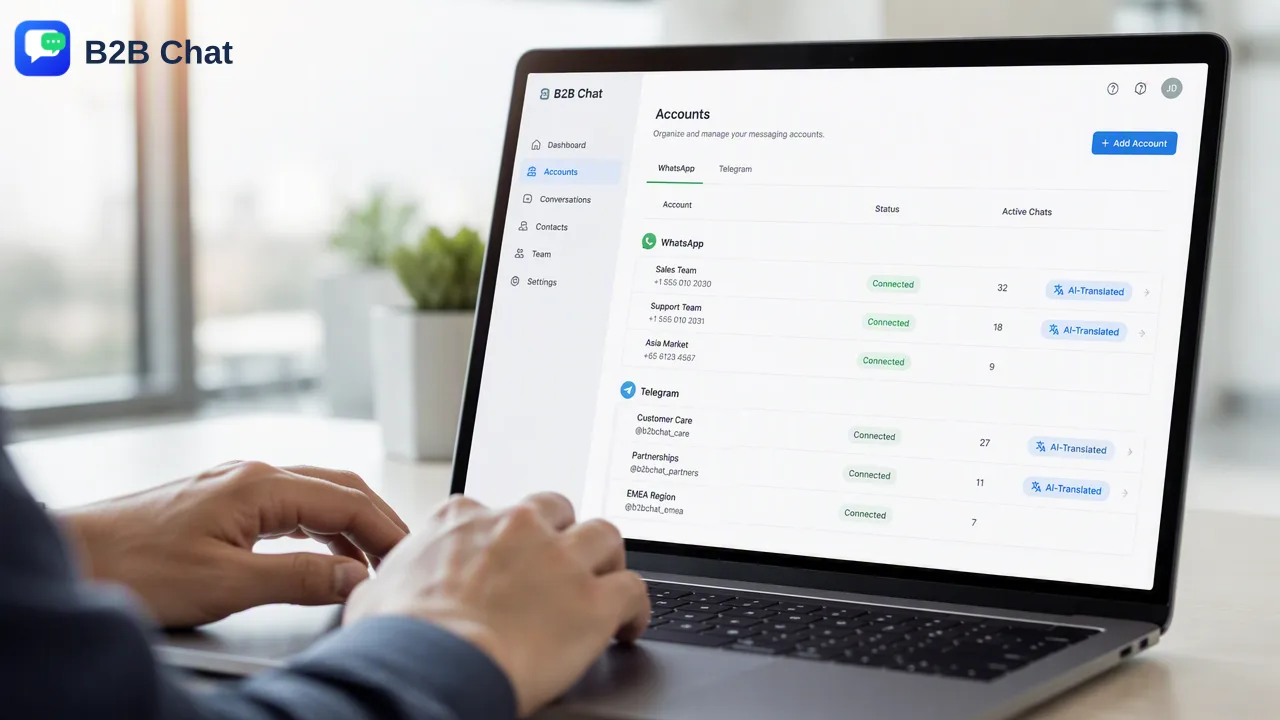
A practical guide for teams to centralize and manage multiple WhatsApp and Telegram accounts using a desktop client, AI translation, and intent-based customer service automation.
To organize multiple WhatsApp Telegram accounts effectively, teams can use a centralized desktop client to aggregate all connections into a single workspace. By grouping these accounts based on specific markets or functional roles, operators can streamline outbound marketing and customer support workflows without constantly switching devices. Integrating AI tools further supports this structure by automatically translating messages across 200+ languages and interpreting customer intent to assist with first-line responses. This consolidated approach helps global support and marketing teams maintain clear oversight of high-volume conversations across both messaging platforms.
Centralizing Your Messaging Infrastructure
Operating global marketing and customer support campaigns often requires handling numerous communication channels simultaneously. When teams attempt to manage these channels across fragmented devices or separate browser tabs, it creates operational friction and slows down response times. A more efficient workflow involves account aggregation, which brings all connections into one unified interface. Using a dedicated desktop client—available for both Windows and macOS—teams can connect and operate multiple WhatsApp and Telegram accounts from a single workspace. This multi-account management capability reduces tool switching and provides a comprehensive view of all active conversations. Instead of distributing physical devices among team members, operators can log into the centralized client to monitor inbound inquiries and execute outbound marketing tasks. Consolidating these platforms into one environment helps teams maintain consistent communication standards and supports faster routing of complex issues to the appropriate human reviewers.
Structuring Accounts by Market and Function
Once the messaging infrastructure is centralized, the next step is establishing a logical hierarchy for the connected profiles. Without a clear organizational structure, high-volume messaging environments can quickly become difficult to navigate. Teams should categorize their aggregated accounts based on specific operational needs, such as geographic regions or distinct business functions. For cross-border ecommerce and global marketing teams, grouping accounts by target market helps operators tailor their communication strategies to local time zones and cultural expectations. Alternatively, structuring accounts by function—separating outbound promotional channels from inbound customer service lines—helps support operators only see relevant troubleshooting queries. This functional separation supports clearer access expectations and helps managers review conversation coverage more effectively. By defining these groupings within the multi-login workspace, organizations can scale their messaging operations while maintaining strict boundaries between different types of customer interactions.
Scaling Support with AI Automation
Managing a high volume of international conversations requires more than just a centralized interface; it also demands intelligent routing and language support. Integrating artificial intelligence into the daily workflow assists teams in handling diverse customer inquiries without requiring a massive expansion of multilingual staff. The first component of this automation is AI Translation. When operating across global markets, teams frequently encounter messages in unfamiliar languages. The platform automatically detects and translates customer messages across more than 200 languages. Furthermore, the translation expression is adjusted based on the conversation context, which helps operators understand the nuance of the inquiry rather than relying on rigid, literal translations. The second component is Smart Customer Service. This feature interprets customer intent from incoming messages and the surrounding conversation context. By understanding what the customer is asking, the system assists automated first-line responses. This capability does not replace the human support team; rather, it handles routine inquiries and gathers necessary context before routing more complex issues to human operators. Together, these AI tools support a more efficient workflow for cross-border communication.
Operational Best Practices for Teams
Establishing a sustainable workflow requires understanding the capacity and cost structures of the chosen tools. When planning a multi-account strategy, teams must consider how their infrastructure will scale as conversation volumes grow. The platform supports unlimited account registrations with no stated port quantity limits and no stated usage-duration limits. This open architecture supports businesses in adding new WhatsApp and Telegram profiles as their market presence expands, without encountering artificial caps on the number of connected accounts. Additionally, teams should monitor their usage of automated features to manage operational costs effectively. The AI capabilities are billed on a per-request basis. Specifically, AI Translation is publicly listed at $0.002 per request, while Smart Customer Service is publicly listed at $0.02 per request. By tracking these per-request metrics, managers can forecast their monthly expenditures and adjust their automation strategies based on peak traffic periods. Finally, teams should utilize official public support paths, such as the designated Telegram contact channels and official product-update channels, to stay informed about new features and maintain their centralized workspace.
FAQ
Can I manage both WhatsApp and Telegram in one place?
Yes, the desktop client supports account aggregation for both WhatsApp and Telegram. Teams can connect and operate multiple accounts from a single Windows or macOS workspace, which helps consolidate outbound marketing and customer support workflows.
How does AI translation handle different languages?
The AI Translation feature automatically detects and translates customer messages across more than 200 languages. It adjusts the translation expression based on the conversation context, assisting operators in understanding nuanced international inquiries.
Are there limits to how many accounts I can connect?
The platform features fully open ports with unlimited account registrations. There is no stated port quantity limit and no stated usage-duration limit, allowing teams to scale their connected messaging profiles as needed.
How does the system assist with first-line customer responses?
The Smart Customer Service feature interprets customer intent from incoming messages and the broader conversation context. This helps assist automated first-line responses for routine queries before routing more complex issues to human reviewers.
How are the AI features billed for team usage?
The AI tools operate on a per-request pricing model. AI Translation is publicly listed at $0.002 per request, and Smart Customer Service is publicly listed at $0.02 per request.