How to Review Translated WhatsApp Customer Messages Before Replying
Learn how to review translated WhatsApp customer messages in B2B Chat, verifying quantities, dates, and phrasing before sending replies.
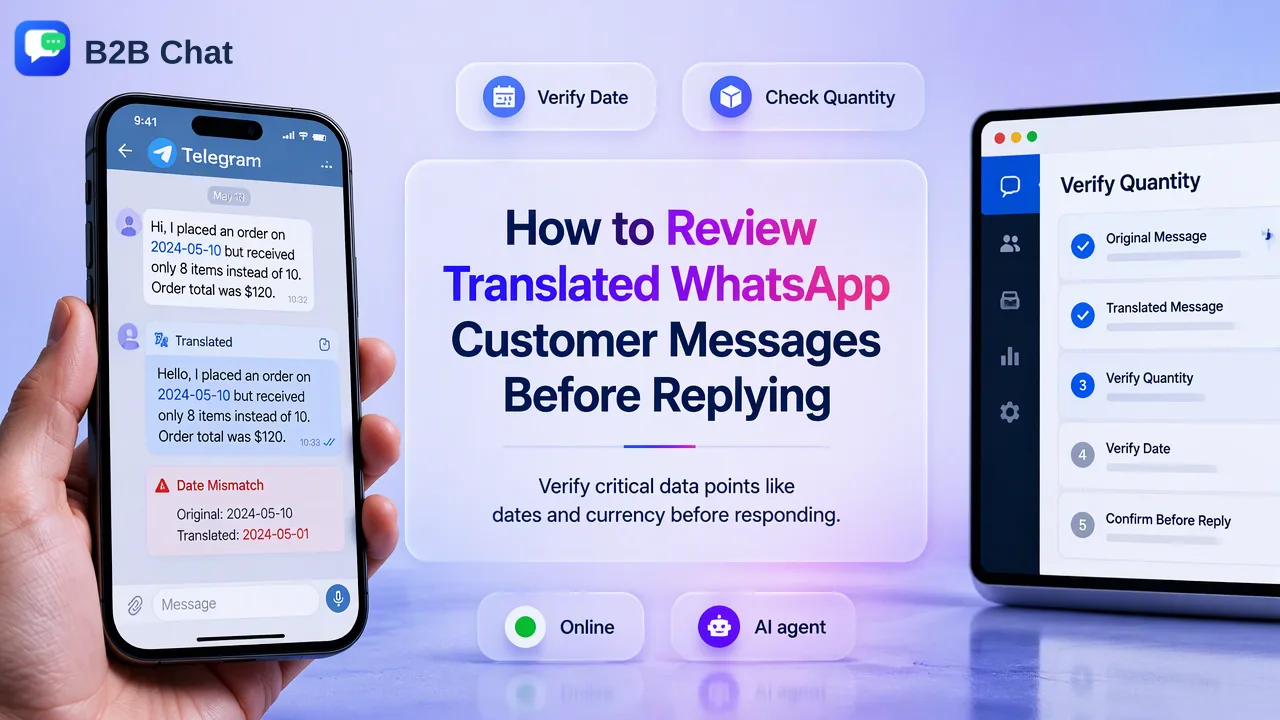
A practical guide for cross-border support teams on reviewing AI-translated WhatsApp customer messages, checking critical details like dates and quantities, and verifying outgoing replies.
To review translated WhatsApp customer messages before replying, support agents should verify critical details—such as numerical quantities, calendar dates, product specifications, and currency symbols—against the customer's original incoming text. Implementing a human-in-the-loop review workflow alongside a WhatsApp chat translator helps support staff catch contextual ambiguities and confirm the tone of outgoing replies before sending them to cross-border buyers.
The Role of AI Translation in Cross-Border Support
Operating cross-border customer service requires handling inquiries across multiple languages and regional dialects. Automated translation assists teams by converting incoming messages into an agent's primary working language and translating outgoing responses back to the customer.
B2B Chat provides Smart Translation, which supports automatic language detection and context-aware two-way translation across 200+ languages. Because language nuance and conversational context vary significantly across global markets, translation software is designed to assist rather than replace human judgment. Machine translation models interpret conversational context to select fitting terms, but they do not promise absolute accuracy across every colloquialism or industry acronym.
Establishing a structured review routine helps support teams use automated translation effectively. Agents who understand the operational boundaries of automated tools can readily identify discrepancies, preserve customer trust, and maintain professional communication standards across global markets.
Incoming Message Verification: Checking Quantities, Dates, and Context
Before formulating an answer, agents must inspect the incoming translation against the original customer message. Ambiguities often arise in numbers, dates, units of measurement, and colloquial phrasing.
Support teams can apply a three-step review checklist for incoming messages:
- Verify Numbers and Measurement Units: Inspect numerals in the original message alongside the translated output. Automated engines can occasionally alter decimal points, thousand separators, or metric and imperial units (such as kilograms versus pounds).
- Confirm Dates and Scheduling: Different regions write calendar dates differently (e.g., DD/MM/YYYY versus MM/DD/YYYY). Agents should check the source text to ensure the translated date corresponds with the buyer's intended timeline.
- Identify Contextual Ambiguity: If a customer uses slang or idiomatic phrasing, the literal translation may sound unclear or out of place. Operators should view the raw message to evaluate whether the customer is expressing dissatisfaction, urgency, or a specific technical constraint.
| Message Element | Potential Ambiguity | Recommended Verification Action |
|---|---|---|
| Order Quantities | Separator confusion (commas vs. periods) | Compare translated number directly against source text numerals. |
| Delivery Dates | Format variations (day/month vs. month/day) | Confirm the calendar context and clarify directly if ambiguous. |
| Technical Specifications | Mistranslated model codes or trade terms | Check product codes against the internal catalogue or CRM records. |
| Pricing & Currency | Currency symbol conversion or omission | Confirm the exact currency stated in the customer's original inquiry. |
Outgoing Message Preparation: Tone and Two-Way Translation
Reviewing outgoing customer replies is just as critical as parsing incoming requests. A message that sounds natural in the agent's language may translate into an overly blunt, confusing, or formal phrase in the recipient's language.
When preparing outgoing replies in the B2B Chat desktop client (available for Windows and macOS), agents should follow these best practices:
- Keep Source Sentences Simple: Write short, structurally direct sentences. Avoid complex subordinate clauses, regional proverbs, and double negatives that might confound translation algorithms.
- Preview the Outgoing Translation: Review the translated output before sending. Many experienced agents perform a back-translation check to verify that the core meaning remains intact.
- Standardize Common Phrases: For recurring questions regarding shipping policies, warranty claims, or product instructions, support teams can reference approved phrasing from the CRM console reply library to maintain consistency.
- Distinguish Translation from Automated Bots: Recognize the operational difference between translation and automated customer service agents. While Smart Translation handles two-way message translation for live agents, automated bots like Smart Service handle routine context-driven replies independently. Keeping human oversight on complex, customized replies helps preserve relationship quality.
Managing Ambiguous Wording and High-Stakes Inquiries
Certain conversations carry higher operational stakes, such as bulk purchase agreements, custom manufacturing orders, or escalated shipping disputes. In these situations, relying solely on automated translation without active clarification creates operational risks.
When ambiguous wording appears in a customer interaction, teams should apply the following escalation steps:
- Consult Conversation History: Use the CRM console to inspect past customer records, previous support tickets, and interaction notes. Historical context often reveals whether a customer habitually uses certain terms or abbreviations.
- Ask Direct, Clarifying Questions: Rather than guessing what an ambiguous sentence means, the agent should reply with a polite, specific clarification question presenting the available interpretations.
- Incorporate Visual Confirmations: When discussing product parts, dimensions, or packaging requirements, agents can share annotated images or diagrams in the chat session to supplement translated text.
By treating AI translation as a structured communication aid and embedding human verification into every stage of the workflow, cross-border support teams can conduct accurate, reliable customer conversations across global markets.
FAQ
Does Smart Translation guarantee complete linguistic accuracy?
No. While Smart Translation provides context-aware two-way translation across more than 200 languages with automatic language detection, it does not promise perfect accuracy. Support teams should maintain human oversight for high-stakes messages, specialized technical specifications, and contract terms.
How should teams handle industry-specific terminology in translated chats?
When dealing with specialized jargon, agents should cross-reference translated phrases with the original message text. If a technical term appears ambiguous or translates into a generic description, agents can consult internal glossaries, review customer records in the CRM console, or send a polite clarification request to the customer.
Can teams use the same translation review workflow across other messaging apps?
Yes. Within the B2B Chat desktop client, teams can manage incoming and outgoing conversations across WhatsApp, Telegram, and LINE. The same verification routine applies when inspecting translated messages across any of these supported platforms.
Learn More
Choose the product information that fits the next step in your workflow.