What Is a Shared Team Inbox?
A shared team inbox centralizes customer messages from multiple accounts into one workspace, helping support teams manage conversations efficiently.
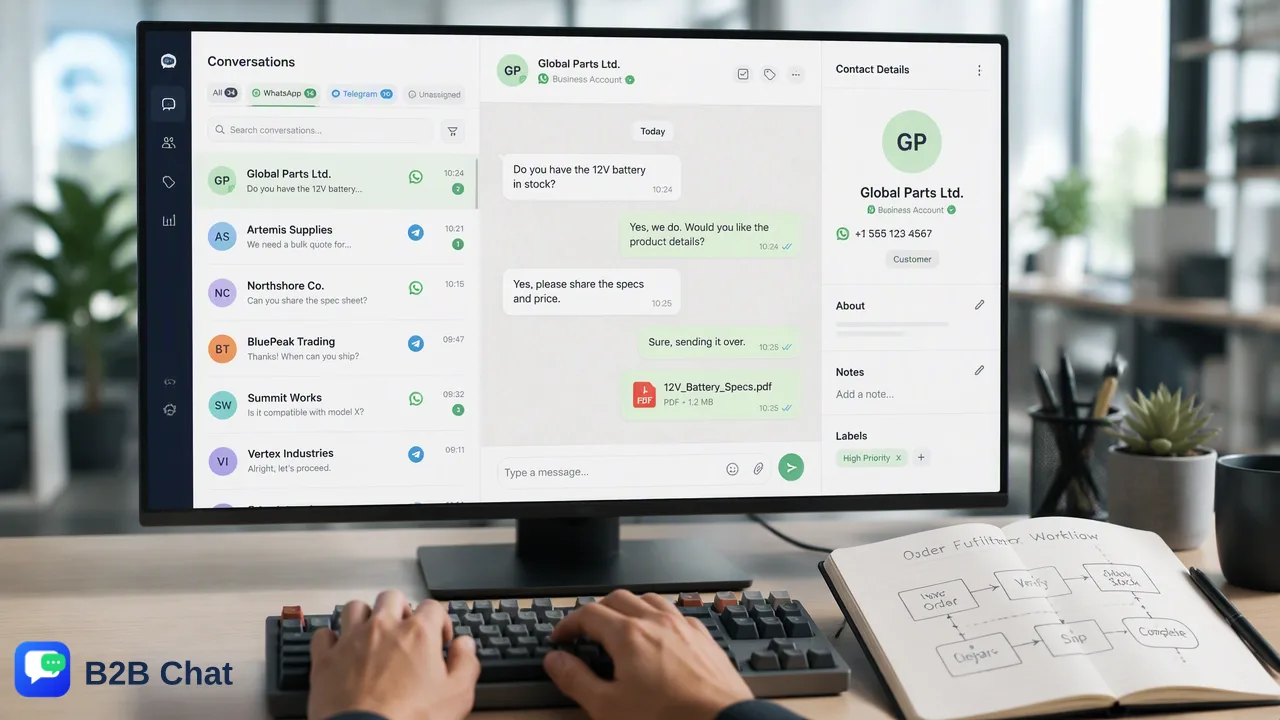
A shared team inbox centralizes customer messages from multiple accounts into a single workspace, helping support teams manage conversations efficiently.
A shared team inbox is a centralized communication workspace that allows multiple team members to access, manage, and respond to customer messages from a single interface. By aggregating messages from multiple accounts into one location, this model removes the requirement for individual logins and provides a unified view of conversation history. For customer service and global marketing teams, a shared inbox replaces fragmented personal accounts with a single operational hub, supporting consistent coverage and streamlined collaborative workflows.
Defining the Shared Team Inbox
At its core, a shared team inbox is an operational model designed to consolidate external communications into a single, accessible environment. Instead of routing customer inquiries to individual devices or isolated applications, organizations route incoming messages to a unified workspace where authorized team members can view, assign, and resolve them. This centralization helps teams maintain context across multiple interactions and supports a more organized approach to customer service. For organizations operating across global markets, managing communications often involves handling multiple messaging platforms simultaneously. A comprehensive customer service tool for WhatsApp and Telegram, such as B2B Chat, provides the infrastructure for this model. By allowing users to manage multiple accounts in one place, the shared inbox framework reduces the friction associated with monitoring disparate channels and helps teams maintain a clear overview of all active customer conversations.
Shared Inbox vs. Individual Accounts
The traditional approach to customer communication often relies on individual accounts, where each team member logs into a separate application or device to respond to messages. This siloed model creates significant operational challenges. When conversations are locked behind personal logins, the broader team lacks visibility into the customer's history, making it difficult to provide consistent support if a team member is unavailable or if an inquiry requires escalation. In contrast, a shared team inbox centralizes these interactions. The primary distinction lies in accessibility and conversation continuity. Rather than fragmenting data across multiple isolated instances, a shared workspace aggregates the data. Teams can manage multiple accounts in one place, providing a single source of truth for all customer interactions. This visibility helps organizations avoid duplicate responses, supports faster handoffs, and fosters a more collaborative environment where team members can seamlessly transfer conversations without losing critical context.
Operational Benefits for Support Teams
Transitioning to a centralized management model offers several practical advantages for support and marketing operations. The most immediate benefit is the reduction of tool switching. When operators are forced to toggle between different devices or applications to check various accounts, response times can suffer, and the risk of missing messages increases. A shared inbox streamlines this process through account aggregation. For example, teams can connect and operate multiple WhatsApp and Telegram accounts from a single downloadable client for outbound marketing and support. By utilizing a desktop client available for Windows and macOS, organizations can bring all relevant communication channels into a standard desktop environment. This multi-account management capability supports efficient daily operations, allowing support staff to focus on resolving customer inquiries rather than navigating between different software interfaces. Furthermore, having all accounts in one place helps managers monitor conversation volume and allocate resources more effectively during peak support hours.
Implementing a Unified Workflow
Implementing a shared team inbox involves more than just aggregating accounts; it also provides a foundation for integrating advanced workflow tools that assist human operators. Once communications are centralized into a single desktop client, teams can introduce capabilities that help manage high message volumes and diverse customer bases. One key addition to the unified workflow is automated assistance. Within the shared workspace, AI customer service can interpret customer intent from incoming messages and conversation context to assist automated first-line responses. This allows the system to handle initial inquiries while human operators focus on more complex issues. Additionally, for cross-border ecommerce and global marketing, language barriers can be addressed directly within the inbox. AI translation automatically detects and translates customer messages across 200+ languages, with the translation expression adjusted based on conversation context. By combining account aggregation with these assistive tools, organizations can build a robust, scalable workflow that supports efficient global customer service.
FAQ
How do teams manage multiple messaging platforms simultaneously?
Teams can use a single downloadable client to connect and operate multiple accounts without switching devices. For example, B2B Chat supports the aggregation of multiple WhatsApp and Telegram accounts into one desktop interface for Windows and macOS, allowing operators to handle outbound marketing and support from a centralized location.
What is the difference between a shared inbox and an automated support system?
A shared inbox is the organizational workspace where team members view and manage messages, whereas an automated support system is a tool integrated into that workspace. For instance, AI customer service can interpret customer intent from incoming messages and conversation context to assist automated first-line responses, while human operators use the shared inbox to review those interactions and manage the overall workflow.
How does a shared workspace handle multilingual customer conversations?
A centralized workspace can integrate translation tools to support global operations directly within the message thread. AI translation can automatically detect and translate customer messages across 200+ languages, with the translation expression adjusted based on conversation context, helping teams communicate effectively without relying on external translation applications.