How to Run Multiple Telegram Accounts on One Computer for Customer Conversations
Run Telegram multiple accounts on PC: compare the official account switcher with a team client, and plan notifications, translation and handover.
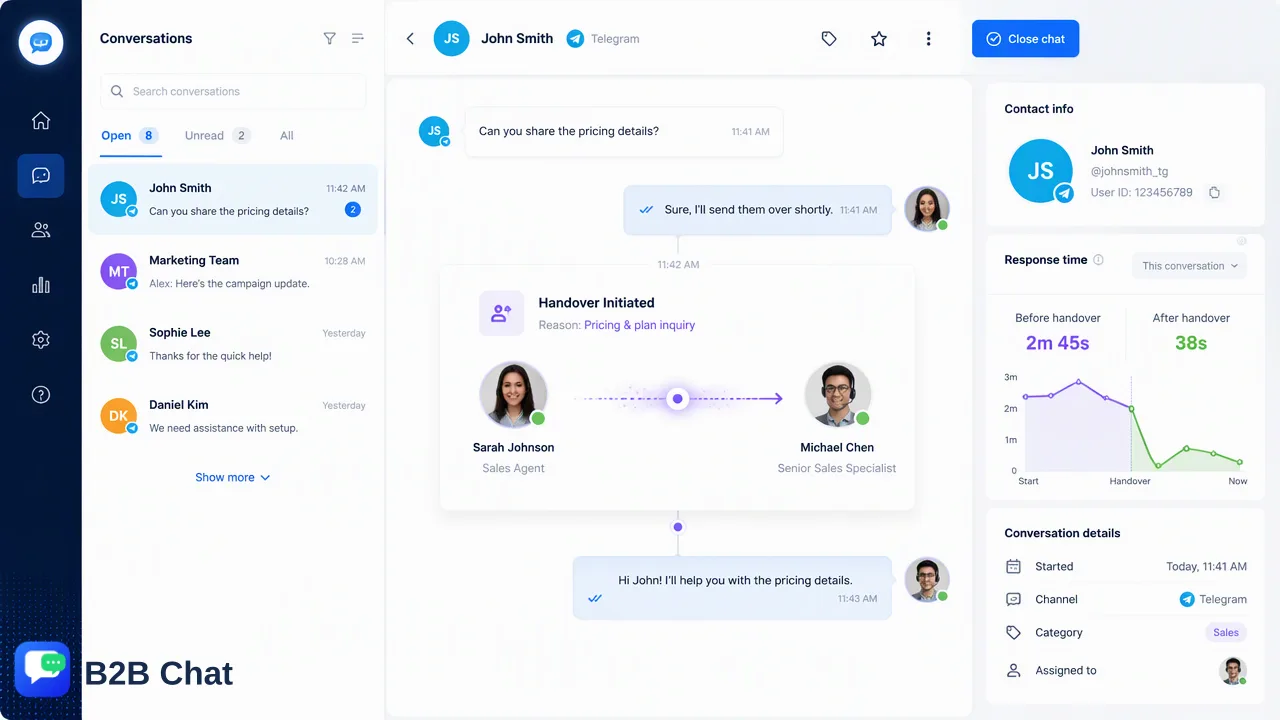
Compares Telegram's built-in multi-account switching on desktop with a multi-account client for teams that hold one Telegram account per market or agent.
Telegram's official apps let one person sign in to several accounts and switch between them without logging out, which is enough for a single operator with two or three numbers. Teams that hold one Telegram account per market or per agent usually outgrow that: notifications blur together, nobody can see who answered what, and customer history lives with whoever holds the login. For those teams, Telegram multiple accounts on PC works better in a desktop client built for aggregation, with translation and handover handled in the same place.
What the official Telegram desktop switcher does well
Telegram's own FAQ states that it is possible to log in to one Telegram app with several different accounts at once and switch between them without logging out. Each account still needs its own phone number, and each keeps its own chats, contacts and settings.
For one person managing a personal account plus a work account, this is the right tool. It is free, official and needs no setup beyond adding an account from the menu and signing in by QR code or phone number.
Its limits show up when the accounts represent a business:
- One viewer at a time. You see the registered account's chats; messages arriving on the others are only a notification badge until you switch.
- No team layer. There is no notion of an agent, a shared customer record or a handover note. The login itself is the only access control.
- No language support. A Telegram account serving Indonesian or Spanish speaking buyers still needs copy-and-paste into a separate translator.
- History follows the login. If the person who holds a number leaves, the conversations leave with them unless the login was shared.
When a team needs more than an account switcher
A useful test is to ask who needs to see the conversation, not how many accounts exist. If more than one person touches an account, or one person covers accounts in several markets, the switcher becomes the bottleneck.
| Situation | Official switcher | Multi-account client |
|---|---|---|
| One operator, 2-3 accounts | Works | Optional |
| One account per market, several agents | Hard to share safely | Designed for it |
| Customers write in other languages | Manual translation | Built-in two-way translation |
| Staff turnover matters | History tied to a login | Accounts and customer records held by the company |
| WhatsApp and LINE as well | Separate apps | One window for all three |
B2B Chat is a desktop client for Windows and macOS that aggregates and multi-opens Telegram, WhatsApp and LINE accounts. It does not cover other messaging platforms, so it fits teams whose customers are on those three. The WhatsApp multi-account guide shows the same approach on the WhatsApp side.
How to set up Telegram multiple accounts on PC in a team client
- List the accounts and owners. Write down which number serves which market or product line, and which agents cover it. One account per market keeps a customer talking to a consistent identity.
- Download and install the desktop client. The desktop client is free to download for Windows and macOS. The web consoles are for management; messaging sessions run in the client.
- Bind each Telegram account. Activation codes identify a working session and can be restricted to one device or left unrestricted. Decide per account whether it should stay on one computer.
- Open the accounts side by side. Aggregation means the conversations appear in one client instead of one registered account at a time.
- Name support seats. Give each agent a seat so replies can be traced to a person and accounts are not shared through a single password.
- Agree notification habits. Decide who watches which account during which hours, so an unanswered message is never assumed to be someone else's.
Translation, groups and handover
Reading and replying in the customer's language
Smart Translation detects the customer's language automatically and translates in both directions across 200+ languages, adjusting wording to conversation context.
Handover between agents
Because the accounts and customer records belong to the team's console rather than to one person's phone, a new agent can read the earlier conversation before replying. Write a short note per customer when a conversation changes hands: what was asked, what was promised, what is pending.
For first-line questions outside working hours, the AI customer service agent can handle routine replies, with staff picking up anything that needs judgment the next morning.
Common mistakes
- Using one shared login on several people's computers, which makes it impossible to tell who replied.
- Switching to a new Telegram number mid-conversation without telling the customer.
- Letting translated replies go out unreviewed on price or contract wording.
- Treating any tool as protection against platform restrictions. Follow Telegram's own rules on messaging and keep outreach relevant and requested.
FAQ
Can Telegram be used with several accounts on one computer?
Yes. Telegram's official apps allow several accounts to be signed in at once and switched without logging out. Each account needs its own phone number.
How can teams share Telegram accounts without sharing passwords?
A multi-account client with support seats lets each agent work in the company's accounts under their own seat, so one login is not passed around.
How can teams answer Telegram customers who write in another language?
Two-way automatic translation shows the customer's message in the team's language and translates the reply back, with the original text available for checking. Sensitive wording should still get a human review.
Does a multi-account client support platforms other than Telegram?
B2B Chat supports Telegram, WhatsApp and LINE. Other messaging platforms are not supported.
Learn More
Choose the product information that fits the next step in your workflow.