WhatsApp Keyword Auto-Replies vs AI Customer Service: Which One Handles Which Questions
Compare WhatsApp keyword auto-replies with AI customer service: which questions each handles, how they work together, and where staff must review.
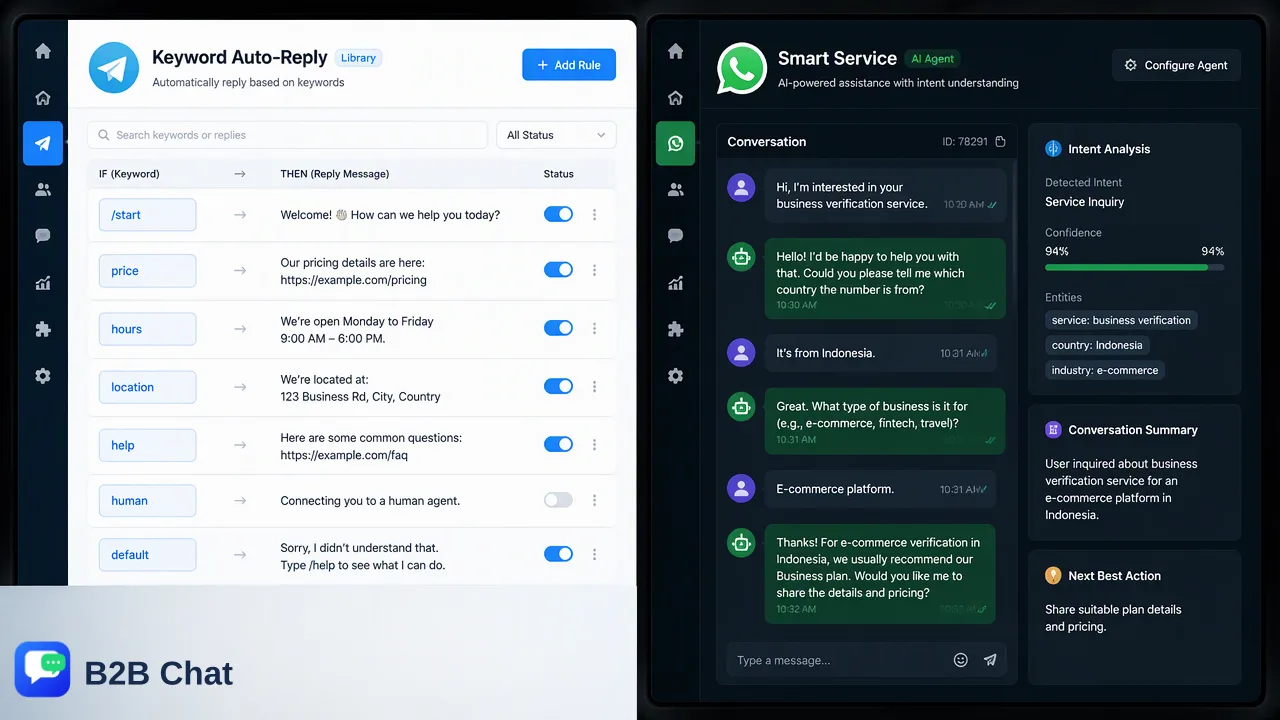
Keyword auto-replies suit fixed, predictable questions; an AI agent suits routine questions phrased in many ways. Staff still own exceptions.
A WhatsApp auto reply sends fixed text when a rule fires, such as a greeting, an away message or a matching keyword. AI customer service reads the conversation and composes a reply to a routine question. Keyword rules are best for questions with one stable answer, an AI agent is best for routine questions that customers phrase in many different ways, and staff should keep anything involving exceptions, complaints or money.
What WhatsApp auto replies actually are
The WhatsApp Business app includes a small set of built-in automations. According to WhatsApp Business's feature overview, greeting messages welcome customers who start a conversation, away messages reply outside business hours, and quick replies save shortcuts for messages you send often.
The important difference is who triggers what.
| Feature | Triggered by | Content |
|---|---|---|
| Greeting message | A customer starting a conversation | Fixed welcome text |
| Away message | A message arriving outside set hours | Fixed text with expectations |
| Quick reply | A staff member choosing a shortcut | Saved text the agent sends |
None of these reads the customer's question. They send the same wording to everyone, and quick replies still need a person in the chat. That is exactly why they are reliable: the answer is known before the question arrives.
Keyword auto-replies: rule-based answers
A keyword auto-reply goes one step further than a greeting. A team configures matching words, and when a customer message contains one, a prepared answer is sent. In B2B Chat these live in the CRM console's reply library as keyword auto-replies, next to greetings, single replies and bulk scripts.
Keyword rules work well when:
- the question has one stable answer, such as opening hours, a catalog link, or the steps to place an order;
- customers tend to use the same few words, such as "price", "catalog" or "shipping";
- a wrong answer is cheap, because the reply is only a pointer to more information.
They struggle when wording varies. A customer who writes "how long until it reaches Jakarta" may never type the keyword "shipping", and a customer who writes "shipping is too slow" does contain it but is complaining, not asking. A rule only sees words, not intent.
AI customer service: context-aware first-line replies
An AI agent reads the conversation, including earlier turns, and writes a reply to the question in front of it. In B2B Chat this is Smart Service, described on the AI customer service page. It is an AI agent for routine, parallel, multi-turn customer replies, so several conversations can be handled at once, including outside staff hours.
AI suits questions like:
- stock, sizes and basic product details that appear in the team's prepared knowledge base;
- order or shipping steps that customers phrase in many ways;
- follow-up questions that depend on the previous message, such as "and for the blue one?";
- first-line responses in the buyer's language when combined with translation.
Its quality depends on the knowledge base the team prepares. If a question is not covered, a good setup hands the conversation to staff instead of improvising. Smart Service is first-line assistance, not a promise that every case is resolved without people.
Side-by-side comparison
| Question type | Keyword auto-reply | AI customer service |
|---|---|---|
| One fixed answer, same wording each time | Strong fit | Works, but may be more than needed |
| Same question, many phrasings | Misses variations | Strong fit |
| Follow-up depending on earlier messages | Cannot use context | Reads conversation context |
| Complaints, refunds, disputes | Wrong tool | Route to staff |
| Price negotiation, custom quotes | Wrong tool | Route to staff |
| Predictability of the reply text | Fully predictable | Varies with the question and knowledge base |
| Setup effort | List keywords and answers | Prepare and maintain a knowledge base |
The two are also billed differently in B2B Chat. Keyword auto-replies are a reply-library feature, while Smart Service is a separately metered AI capability charged per reply. Treat them as distinct features, not as two names for the same thing.
How to combine them in one workflow
Most teams do better with layers than with a single tool.
- Greeting and away messages set expectations the moment a chat starts or when the team is offline.
- Keyword rules answer the handful of questions with one fixed answer, such as the catalog link or ordering steps.
- AI first-line replies take the routine questions that rules miss, using the team's knowledge base and conversation context.
- Staff queue receives anything the AI cannot answer, anything emotional, and anything involving a quote, refund or exception.
Map each layer to a written list. For every common question, decide which layer owns it. If a question appears in two layers, decide which one wins so the customer does not receive two different answers. This also makes it easy to review: when a customer complains about a reply, the team knows which layer produced it. Teams running several numbers can apply the same lists across accounts managed in one client, as described on the WhatsApp multi-account page.
Where staff must keep control
Automation helps with volume, not judgment. Keep these with people:
- Pricing exceptions and quotes. A wrong figure creates a commitment.
- Complaints and refunds. Tone and context matter more than speed.
- Delivery promises. Dates depend on factory and carrier information the AI may not have.
- First contact with a high-value lead. A personal reply often matters.
- Anything the knowledge base does not cover.
Review a sample of automated replies every week. Read the actual conversations, note questions the AI handled badly, and either add the answer to the knowledge base or move the question to the staff queue. Also check that keyword rules do not fire on complaints. Automated replies should also respect platform rules and customer consent; they are not a substitute for opt-in or a way around messaging limits.
FAQ
What is the difference between a WhatsApp auto reply and AI customer service?
An auto reply sends fixed text when a rule fires, such as a greeting, an away period or a keyword. AI customer service reads the conversation context and writes a reply to the question asked. Rules are predictable; AI handles varied phrasing.
Can keyword auto-replies replace an AI agent?
For a small set of questions with one stable answer, keyword replies can be enough. They cannot interpret intent or earlier messages, so questions phrased in many ways usually need an AI agent or a person.
How can teams decide which questions to automate?
Teams can list the most frequent questions from recent chats, mark each as fixed answer, routine but varied, or needs judgment, and assign the first to keyword rules, the second to an AI agent with a prepared knowledge base, and the third to staff.
Does AI customer service resolve every customer case?
No. It is first-line assistance for routine questions. Cases that fall outside the knowledge base, involve complaints or need pricing decisions should be handed to staff, and automated replies should be reviewed regularly.
Learn More
Choose the product information that fits the next step in your workflow.