Integrating Voice Calls into Your WhatsApp Business Workflow: A Guide for Support Teams
Learn how integrating voice calls into your WhatsApp Business workflow helps support teams by centralizing communication and reducing channel switching.
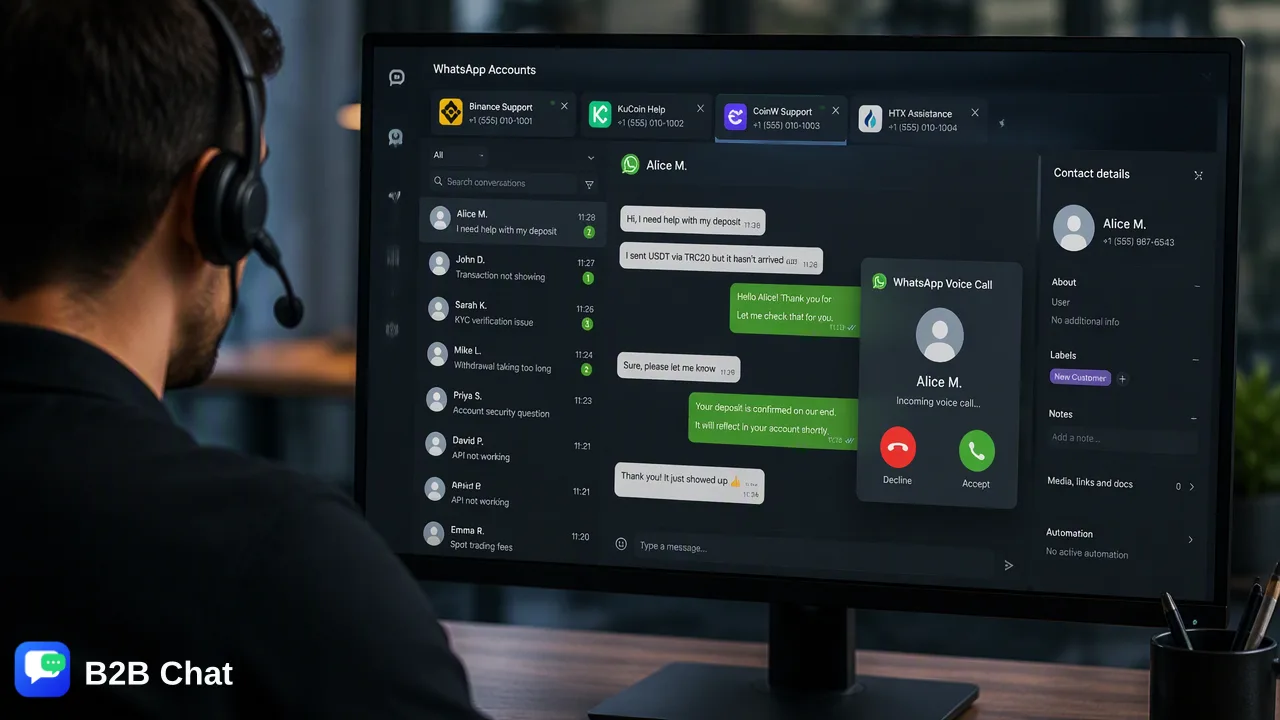
Learn how integrating voice calls into a WhatsApp Business shared inbox helps support teams centralize communication, reduce channel switching, and resolve complex customer inquiries efficiently.
Integrating voice calls into a WhatsApp Business workflow helps support teams by bridging the gap between text-based messaging and real-time voice resolution. By routing incoming calls to a shared inbox, organizations can maintain a unified conversation history and improve agent collaboration. This approach reduces the need for customers to switch channels for complex issues, providing a more cohesive support experience. Centralizing WhatsApp accounts in a single workspace gives teams the context they need to handle both text and voice interactions efficiently, ultimately supporting faster issue resolution and more informed customer service operations.
The Strategic Value of Voice in WhatsApp Support
Customer support teams often face friction when a text-based inquiry becomes too complex for a quick chat exchange. Traditionally, moving a customer from a messaging app to a traditional phone call requires switching channels, which can disrupt the support experience and fragment conversation history. Voice integration bridges the gap between text-based support and real-time resolution directly within the WhatsApp ecosystem. When organizations incorporate voice capabilities into their WhatsApp Business workflow, they reduce the need for customers to switch channels for complex issues. Keeping the interaction on a single platform supports a more continuous and context-aware customer experience. Support agents can transition from text to voice seamlessly, addressing urgent or nuanced problems without losing the thread of the conversation. This unified approach helps teams handle high-stress support scenarios, such as technical troubleshooting or urgent account inquiries, where real-time verbal communication is more effective than typing. By maintaining the interaction within the same application the customer is already using, businesses reduce friction and support a more streamlined resolution process.
Designing a Unified Support Workflow
Managing multiple communication formats requires a centralized approach to avoid siloed information. In a unified workflow, incoming calls can be routed to a shared inbox for team-based handling. This setup means that any available agent can pick up the interaction, rather than tying a specific customer inquiry to a single device or individual. Centralizing call logs and text messages provides a complete conversation history in one place. When agents have access to the full context of previous text exchanges alongside recent voice interactions, they can assist customers more effectively. Utilizing a comprehensive customer service tool for WhatsApp and Telegram, such as B2B Chat, supports this centralization. Teams can connect and operate multiple WhatsApp accounts from a single downloadable client for Windows or macOS. This multi-account management capability helps organizations consolidate their support operations, keeping both text and voice touchpoints tracked within the same workspace. Furthermore, a shared inbox model helps supervisors monitor ongoing interactions and step in if an escalation is required. By operating from a single desktop client, support teams can manage high volumes of incoming requests across multiple regional or department-specific WhatsApp accounts without constantly logging in and out of different devices.
Complementing Voice with AI Customer Service
While voice calls handle complex, real-time resolutions, the initial stages of a customer interaction often begin with text. Integrating AI tools into the shared inbox can help teams manage these initial touchpoints before a voice escalation is necessary. For example, AI customer service features can interpret customer intent from incoming messages and conversation context to assist automated first-line responses. By handling routine text inquiries automatically, support agents have more time to focus on the complex issues that require a live voice call. If a customer's text inquiry indicates a high level of urgency or complexity, the AI can help route the conversation to a human agent who can then initiate or receive a voice call. This division of labor—where AI assists with first-line text responses and human agents handle nuanced voice resolutions—optimizes the overall support workflow. Additionally, for global teams, AI translation can automatically detect and translate customer messages across 200+ languages, adjusting the translation expression based on conversation context. This means that when an agent reviews the text history prior to a voice call, they fully understand the customer's needs regardless of the original language.
Operational Best Practices and Compliance
Implementing voice features requires adherence to platform guidelines and operational best practices. One of the primary considerations for support teams is managing costs and compliance. Voice calls received via the WhatsApp Business API are free for the business, making inbound voice support a cost-effective addition to a shared inbox strategy. Organizations can encourage customers to initiate calls for urgent matters, knowing that inbound voice traffic does not incur per-minute platform charges. However, outbound outreach carries strict requirements. Outbound calling requires customer opt-in to maintain compliance. Organizations must collect explicit permission from users before initiating a voice call over the platform. Documenting these opt-ins and integrating them into the shared inbox workflow helps teams support platform compliance and limit spam complaints. Teams should also establish clear routing rules and escalation paths. For instance, organizations might define specific criteria for when an agent should transition a text chat to a voice call. Providing agents with clear guidelines keeps voice calling focused on high-value or complex interactions, rather than routine queries that could be resolved via text.
FAQ
How does voice integration affect support agent productivity?
Voice integration supports agent productivity by reducing the need for customers to switch channels for complex issues. By keeping the interaction within a single platform and routing incoming calls to a shared inbox, agents can resolve nuanced inquiries faster while maintaining full access to the conversation context.
Is it possible to track voice call history alongside text messages?
Yes, centralizing call logs and text messages provides a complete conversation history. When using a shared inbox or a centralized workspace, teams can view both text exchanges and voice interaction records in the same thread, providing agents with full context for future support requests.
What are the compliance requirements for making outbound calls via WhatsApp?
Outbound calling requires customer opt-in to maintain compliance. Organizations must secure explicit permission from users before initiating outbound voice outreach to support platform guidelines and limit spam complaints. Conversely, voice calls received via the API are free for the business and do not require the same outbound opt-in procedures.
How can teams manage multiple WhatsApp accounts for voice and text support?
Teams can manage multiple accounts by utilizing a comprehensive customer service tool that supports multi-account management. For example, connecting and operating multiple WhatsApp accounts from a single downloadable client helps support staff handle incoming text messages and route voice calls without switching between different devices or applications.
Can AI assist in a workflow that includes voice calls?
While voice calls are handled by human agents, AI can assist the text-based portion of the workflow. AI customer service tools can interpret customer intent from incoming messages to assist automated first-line responses. This helps resolve routine queries via text, helping human agents reserve voice calls for complex or escalated issues.