WhatsApp Multi-Account Managers Compared: Browser Profiles, Cloud Phones and Desktop Clients
Clone apps, antidetect browser profiles, cloud phones or a desktop client: how sales teams pick a way to run many WhatsApp numbers day to day.
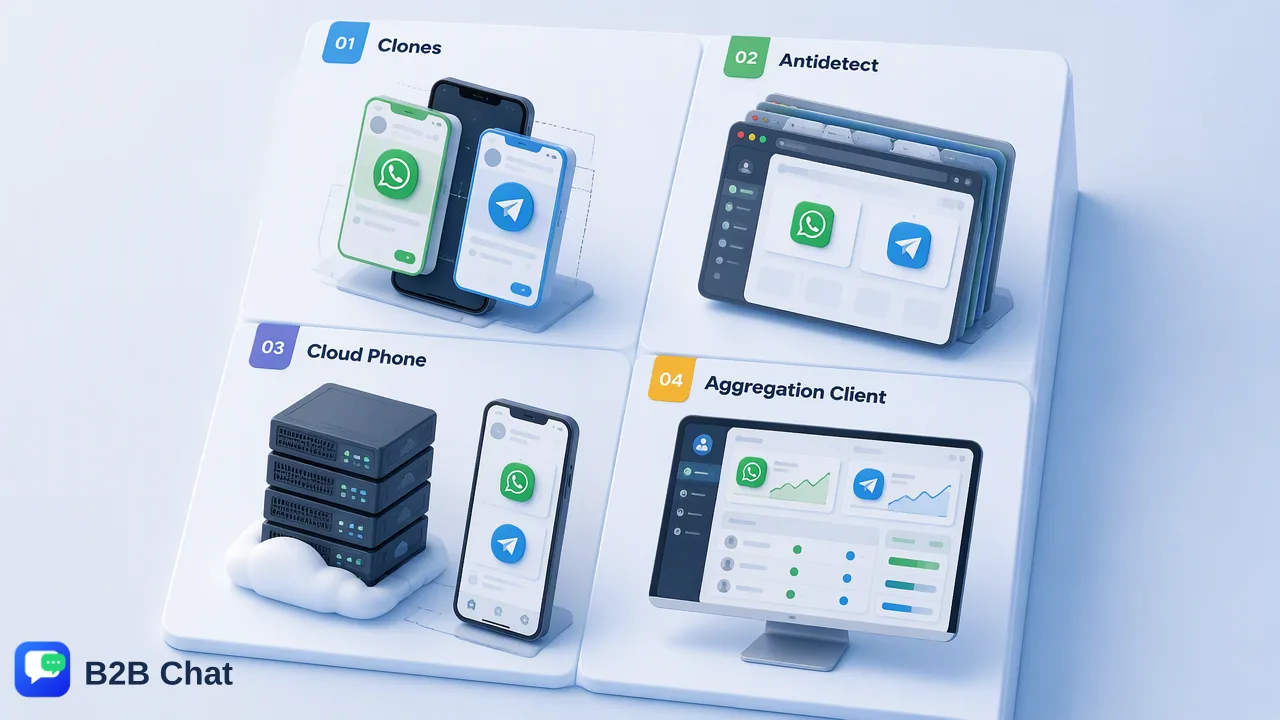
A practical comparison of four ways cross-border sales teams run many WhatsApp numbers, judged on daily operation, staff handover, translation and customer records.
A WhatsApp multi-account manager is any setup that lets one person or team operate several WhatsApp numbers without juggling a drawer of phones. The four common options are phone clone apps, antidetect browser profiles, cloud phones and an aggregation desktop client. For a sales team, the right choice depends less on how many windows it can open and more on how well it handles daily replies, staff handover, translation and customer records.
What a WhatsApp multi-account manager has to handle for a sales team
Most search results for this keyword list tools and count how many accounts each one opens. That number matters far less to a sales or customer-service team than the routine questions that come up every day:
- Daily operation. Can a rep see new messages across every number without clicking through ten tabs, and type replies on a full keyboard?
- Staff handover. When a rep goes on leave or leaves the company, does the conversation history stay with a company-controlled setup, or does it stay on someone's personal device?
- Language. If buyers write in Spanish, Portuguese or Bahasa Indonesia, does the rep have to copy text into a separate translator for every message?
- Customer records. Can the team note order details, preferences and follow-up dates next to the chat, instead of in a separate spreadsheet?
- Supervision. Can a manager review conversations and keep shared reply wording consistent without asking for staff phones?
WhatsApp's own app covers only part of this. The official multiple accounts feature lets a phone keep two accounts logged in, each with its own notification and privacy settings, and the linked devices feature lets one account run on up to four additional devices. Both are useful for an individual or a very small team, but neither adds shared records, reply libraries or assignment between staff. The options below are what teams use once two numbers are no longer enough.
Option 1: Phone clone apps and dual-app features
Many Android phones include a dual-app or app-clone setting that installs a second copy of WhatsApp, and third-party clone apps go further. Combined with WhatsApp's own two-account option, one handset can carry several numbers.
Where it works: a founder or a single rep handling two or three numbers, mostly on the move.
Where it strains:
- Every reply is typed on a phone screen, which slows down long product or shipping explanations.
- Conversations sit on one physical device. If that device belongs to the employee, the company depends on getting it back during a handover.
- Translation means switching to another app for anything the built-in feature does not cover.
- There is no shared view for a supervisor, and no place for customer notes beyond the contact card.
Third-party clone apps are not WhatsApp products, so teams should read the WhatsApp terms and decide whether an unofficial app belongs on a work phone at all.
Option 2: Antidetect browser profiles for WhatsApp Web
An antidetect browser creates separate browser profiles, each with its own cookies and storage, so a team can open WhatsApp Web once per profile. Several vendors market these profiles as a WhatsApp multi-account manager.
Where it works: teams that already use such a browser for other web accounts and want WhatsApp in the same tool.
Where it strains:
- Each profile is still a separate WhatsApp Web window. Reps switch between windows to see who is waiting.
- Translation depends on browser extensions installed per profile, and each extension can read the page it runs on, which includes customer conversations.
- Customer notes, shared replies and seat assignment are outside the browser's job, so teams bolt on spreadsheets.
- Profile management becomes its own task: someone has to track which profile belongs to which number and which employee.
These browsers are built for isolating web sessions in general, not for running a customer-service desk, so the team ends up building the service workflow around them.
Option 3: Cloud phones
A cloud phone is a virtual Android device hosted by a provider and controlled from a computer screen. Teams rent one cloud phone per number and run the normal WhatsApp app inside it.
Where it works: teams that want the mobile app experience without buying handsets, or that already run other mobile apps in the same cloud environment.
Where it strains:
- Each number lives in its own remote screen, so reading many conversations at once means tiling many phone-shaped windows.
- Typing and copying text through a remote device adds friction for long replies.
- Translation, reply libraries and customer records again come from separate tools.
- The customer conversations are hosted by the cloud-phone provider, so the team should review that provider's data handling before moving work chats there.
Cloud phones solve the hardware question well. They do less for the customer-service questions listed at the top of this article.
Option 4: An aggregation desktop client
An aggregation desktop client brings several messaging accounts into one application window designed for conversations rather than general browsing. B2B Chat is one example: a Windows and macOS client that aggregates and multi-opens WhatsApp, Telegram and LINE accounts, with management handled in a separate web console.
How it maps to the sales-team checklist:
| Need | What the desktop client and console provide |
|---|---|
| Daily operation | Several company accounts open side by side in one client, typed on a full keyboard |
| Staff handover | Company-held accounts, support seats and customer records in the CRM console, so history is not tied to one person's phone |
| Language | Two-way chat translation with automatic language detection across 200+ languages |
| Routine replies | A shared reply library, greetings and keyword auto-replies, plus an optional AI agent for routine questions |
| Supervision | Account and device management, sensitive-word controls and conversation review in the console |
Two practical details matter during setup. First, each WhatsApp number is still registered on a phone, so keep the registering handset and SIM under company control. Second, the client uses activation codes that identify a working session and can be restricted to one device or left unrestricted, which lets a manager decide whether a seat may move between computers.
The trade-off: a desktop client is a desk tool. Reps who work mainly from a phone in the field will still use the mobile app for part of their day.
Comparison table: choosing a WhatsApp multi-account manager
| Criterion | Clone apps | Antidetect browser | Cloud phones | Desktop client |
|---|---|---|---|---|
| Where conversations are read | One handset | One window per profile | One remote screen per number | One client window |
| Typing comfort for long replies | Low | High | Medium | High |
| Built-in two-way translation | No | Via extensions | No | Yes |
| Shared reply library | No | No | No | Yes |
| Customer records next to chats | No | No | No | Yes |
| Telegram and LINE in the same place | Separate apps | Separate profiles | Separate apps | Same client |
| Handover when a rep leaves | Depends on getting the phone back | Depends on profile records | Depends on provider account | Seats and records stay in the console |
A simple way to decide:
- Count the people, not just the numbers. One person with three numbers can live with a phone; five reps sharing twenty numbers need seats and records.
- List the buyer languages. If more than one language appears every day, built-in translation saves the most time.
- Ask what happens on the day a rep resigns. The option that answers this without chasing a device is usually the right one for a company.
Habits that matter more than the tool
Whichever manager a team chooses, a few operating habits decide how well it works:
- Register every number to the company. Keep SIMs, registering phones and login details in a company inventory, with an owner recorded for each number.
- Name accounts consistently. Use the market and purpose in the account label, such as "MX-retail-1" or "ID-wholesale-2", so reps and managers can see at a glance what each number is for.
- Write handover notes in the record, not in chat. Order status, agreed prices and next follow-up dates belong in the customer record so a colleague can continue the conversation.
- Message people who expect it. WhatsApp's tools are built for conversations with people who know the business; pace outreach to new numbers gradually and reply promptly to incoming questions.
- Review translated replies on important points. Prices, quantities, sizes and delivery dates deserve a second look before sending, whichever translation method is in use.
- Retire numbers deliberately. When a market or campaign ends, archive the conversations and update the inventory instead of leaving an unattended number online.
FAQ
Is WhatsApp's own two-account feature enough for a small team?
For one person handling two numbers on one phone, often yes. The official feature keeps two accounts logged in with separate notification and privacy settings. It does not add shared customer records, a team reply library or supervision across staff, so teams with several reps usually move to a desktop client or another shared setup.
How can teams keep chat history when a salesperson leaves?
Keep numbers and registering phones under company ownership, run conversations in a company-managed workspace, and write order details and next steps into the customer record. In a desktop client with support seats, the departing rep's seat can be reassigned while the accounts and records stay with the business.
How can teams compare multi-account options before committing?
Run a short trial with real daily work: pick two reps, two buyer languages and a handful of registered numbers, then score each option on time to reply, how often reps leave the window to translate or look something up, and how a simulated handover would work. The comparison table above gives the criteria.
Which WhatsApp multi-account manager also covers Telegram and LINE?
Clone apps, browser profiles and cloud phones treat each messaging app separately. An aggregation desktop client such as B2B Chat runs WhatsApp, Telegram and LINE accounts in the same window, which suits teams whose buyers in Indonesia, Latin America or Asia use different apps.
Learn More
Choose the product information that fits the next step in your workflow.