Running Several WhatsApp Accounts with Built-in Translation: A Setup Guide for Export Sales Teams
Set up several company WhatsApp numbers in one desktop client, switch on two-way translation and build a review routine before replies reach buyers.
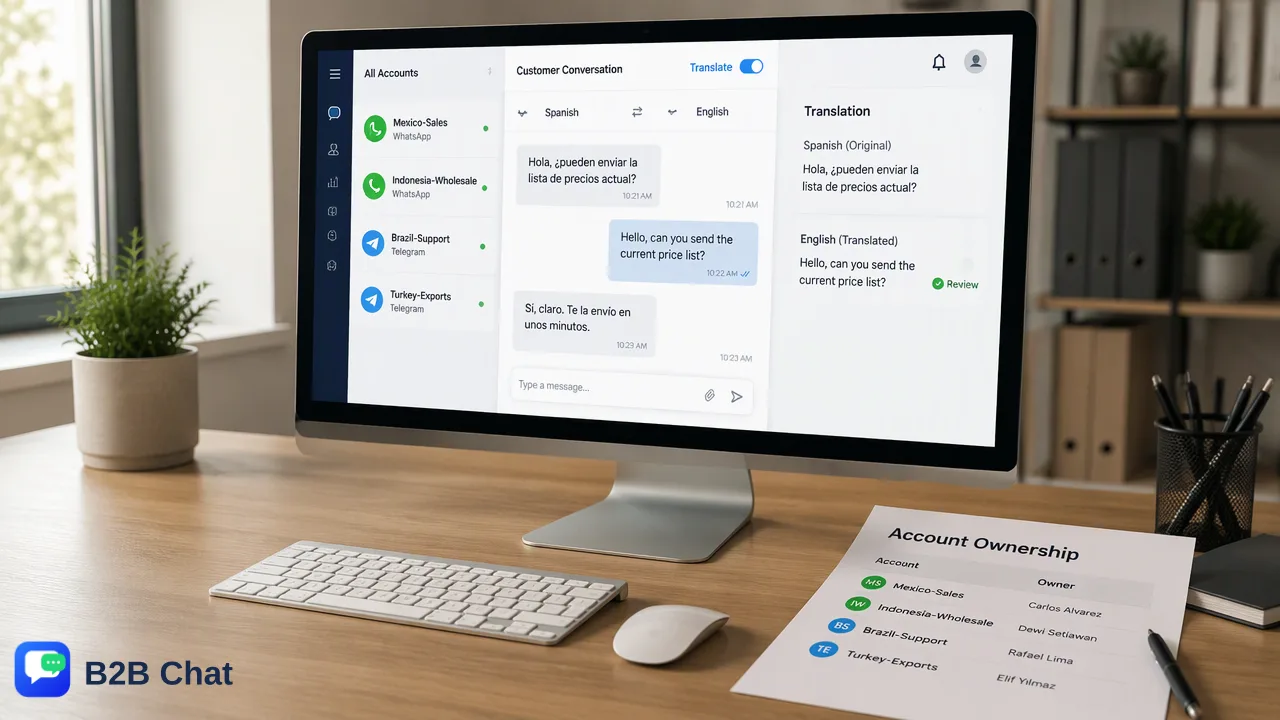
A step-by-step setup guide for export sales teams that want several WhatsApp accounts open in one window with two-way translation and a clear review routine.
WhatsApp multi-open with translation means running several company WhatsApp accounts in one desktop client while incoming messages are translated into the rep's language and outgoing replies into the buyer's. WhatsApp's own apps cover parts of this separately: two accounts per phone and on-device translation of received messages. A desktop client combines multi-open and two-way translation, but a team still needs a setup plan, a review routine for sensitive details and a rule for when a native speaker takes over.
What WhatsApp offers on its own, and where teams hit the limit
Before choosing extra software, it helps to know exactly what the official apps already do.
| Need | Official WhatsApp | Gap for an export sales team |
|---|---|---|
| More than one account | Two accounts on one phone, each needing its own number | Two is the ceiling per phone, and all typing happens on that phone |
| Same account on a computer | Up to four linked devices per account | Each account is a separate window or device; no combined inbox |
| Translating received messages | On-device message translation in chats, groups and Channel updates, with chat-wide automatic translation on Android | Translates what the rep reads; the reply still has to be written in the buyer's language |
| Language coverage | Six languages at launch on Android, a longer list on iPhone | Buyers in markets outside that list are not covered |
The result is that a rep with four numbers and buyers in three languages ends up with several windows, a separate translator tab and a lot of copy-paste. Multi-open with translation removes those steps.
Step 1: Plan the accounts before opening anything
A short plan prevents the most common mess: nobody knows which number belongs to which market.
- List each company number with its market, purpose (pre-sales, after-sales, wholesale) and the phone and SIM that registered it.
- Assign an owner for each number. The owner is responsible for replies; a backup colleague covers leave.
- Record the expected buyer languages per number, such as Spanish for a Mexico number or Bahasa Indonesia for an Indonesia number. This becomes the default target language for replies.
- Decide who manages the console. One administrator should control activation codes, seats and device restrictions.
Keep this list in a shared sheet or in the customer records of the console so it survives staff changes.
Step 2: Install the client and open several WhatsApp accounts
With B2B Chat, the messaging sessions run in a desktop client for Windows or macOS, while accounts, activation codes, replies and billing are managed in a separate web console.
- Activation code. The desktop client uses an activation code that identifies a working session. The administrator can restrict a code to one device, which suits fixed office computers, or leave it unrestricted for staff who move between machines. This code is separate from the email-and-password account used for the web console.
- Add accounts. Add each company WhatsApp number to the client. Each number still has to be registered on a phone first, so keep the registering handset available and charged.
- Label each account. Use the market and purpose from the plan, so a rep can see at a glance which account a buyer wrote to.
- Group by rep or market. If one rep handles all Latin American numbers, keep those accounts together; if reps share accounts, use support seats so each person works from their own seat.
The same client can also hold Telegram and LINE accounts, which helps when some buyers move from WhatsApp to another app. See the WhatsApp multi-account page for how account aggregation is organized.
Step 3: Turn on two-way translation for WhatsApp conversations
Two-way translation in the client has two halves:
- Incoming: the buyer's message is detected automatically and shown in the rep's working language next to the original text.
- Outgoing: the rep writes in their own language and the reply is translated into the buyer's language before sending.
The client's translation feature covers 200+ languages and adjusts wording to the conversation context, which matters for product names, sizes and trade terms that a word-by-word translator handles poorly.
Practical settings to decide once, as a team:
- Rep language. Set each rep's working language, for example Chinese or English, so incoming text always arrives in a language they read comfortably.
- Target language per market. For a number dedicated to one market, confirm the buyer's language early and keep it consistent across the conversation. Automatic detection handles buyers who switch languages, but a consistent default avoids replies in the wrong variety.
- Keep the original visible. Reps should glance at the original message for numbers, model codes and links, which should never depend on translation.
Step 4: Check translated wording before sending
Translation is assistive. A short review routine catches the errors that cost money:
| Check | What to look for |
|---|---|
| Numbers | Prices, quantities, MOQ, sizes and weights match the original exactly |
| Dates | Day-month order and holiday names; write month names instead of 03/04 style dates |
| Currency | Currency code stated (USD, MXN, IDR) rather than a bare symbol |
| Trade terms | Incoterms such as FOB or DDP left untranslated |
| Product names | Model numbers and brand names unchanged |
| Tone | Formal or informal address suits the buyer and market |
Two habits make the review faster:
- Write short, plain source sentences. One idea per sentence, no idioms, no internal abbreviations. Clean input produces cleaner translation.
- Save checked phrasing in the reply library. Once a translated answer about shipping times or payment steps has been reviewed, store it so colleagues reuse the approved version instead of translating from scratch.
Step 5: Decide when to hand off to a native-speaking colleague
Translation handles routine questions well. Some conversations deserve a person who speaks the buyer's language natively:
- Contract and payment disputes, where a single ambiguous word can change obligations.
- Complaints where the buyer is upset and tone matters as much as content.
- Large or custom orders with technical specifications.
- Repeated misunderstandings, such as the buyer asking the same question twice or replying with confusion.
Set a simple rule: when one of these appears, the rep adds a note to the customer record, assigns the conversation to the native-speaking colleague's seat and tells the buyer a specialist will continue. Because the accounts and history are in the shared workspace, the colleague sees the full conversation instead of a forwarded screenshot.
Common setup mistakes
- Mixing personal and company numbers in one client. Keep personal accounts out so records and handover stay clean.
- No owner per account. Unowned numbers collect unanswered messages; every account needs a named owner and backup.
- Translating everything without review. Routine greetings can go straight out; numbers, dates and commitments need a check.
- Rebuilding the same answer daily. Approved translations belong in the reply library.
- Relying on automation for first contact with new numbers. Message people who expect to hear from the business, and pace new outreach gradually.
FAQ
Does WhatsApp translate replies into the buyer's language automatically?
WhatsApp's built-in feature translates messages a user receives, on that user's device. It does not translate the reply that goes out. The buyer receives whatever language the rep typed, which is why sales teams use two-way translation in a desktop client.
How can teams run more than two WhatsApp accounts with translation on one computer?
Use a multi-account desktop client that keeps each company number in one window and applies two-way translation to every conversation. Plan account labels, owners and default buyer languages first, then add the numbers and set each rep's working language.
How can teams keep translated answers consistent across reps?
Review a translated answer once, then store it in the shared reply library under a clear name, such as 'shipping time Mexico'. Reps reuse the approved version, and a reviewer updates it when terms change.
Which details should never rely on translation alone?
Prices, quantities, sizes, model numbers, dates, currency codes, trade terms and links. Keep them visible in the original and check them before sending.
Learn More
Choose the product information that fits the next step in your workflow.