WhatsApp Quick Replies for Teams: Building a Shared Reply Library Everyone Uses
Turn per-phone WhatsApp quick replies into a shared team library: categories, naming, multilingual versions, review and retiring stale answers.
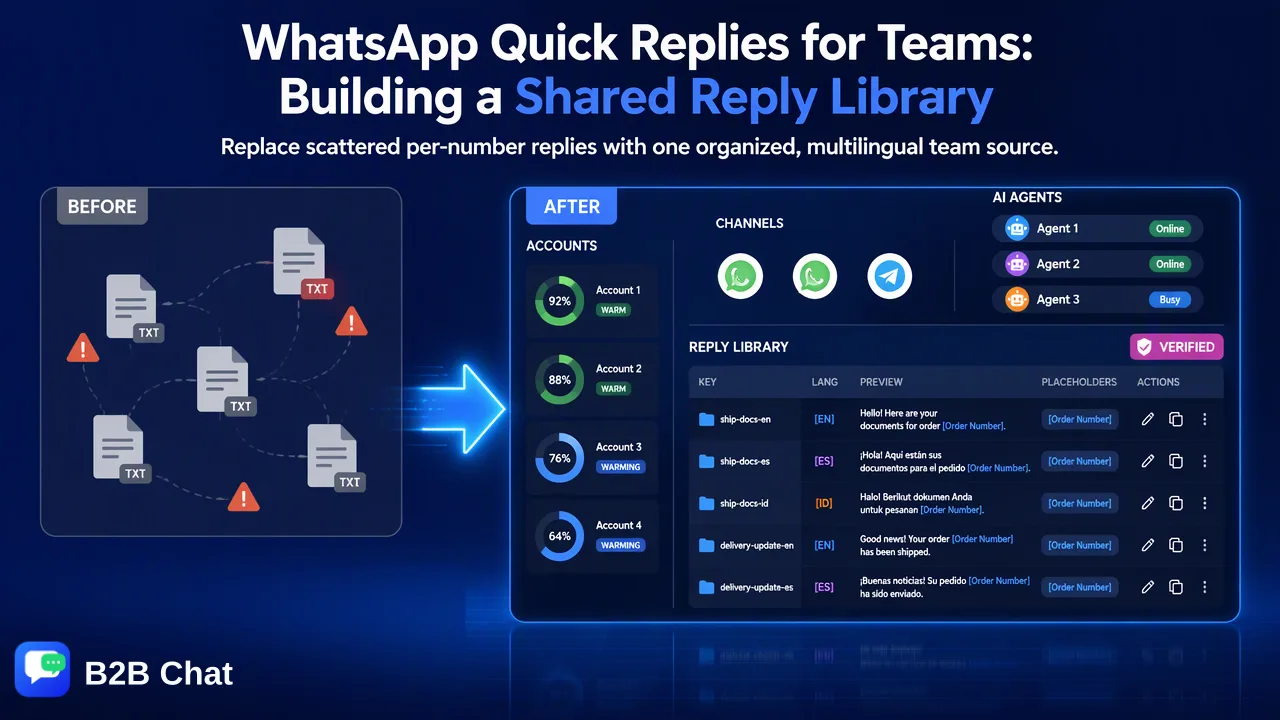
How sales and support teams running several WhatsApp accounts can replace scattered per-number quick replies with one reviewed, multilingual reply library.
WhatsApp quick replies for teams work best as one shared reply library rather than separate lists on each phone. The WhatsApp Business app stores up to 50 quick replies per account and each number keeps its own set, so a team with several numbers soon has duplicated, inconsistent answers. A shared library fixes that with clear categories, a naming convention, reviewed versions in each customer language, an owner for each entry and a regular review that retires outdated answers.
What WhatsApp quick replies do, and where teams hit the limits
According to WhatsApp's help page on how to use quick replies, quick replies are shortcuts for messages a business sends often. In the Business app they are created under Tools > Quick replies, each with a shortcut, and used by typing "/" in the message field or choosing Quick reply from the attach menu. The text can be edited before sending. Key details from that page:
- An account can store a maximum of 50 quick replies.
- Quick replies can include images and videos, but media is not supported in quick replies on WhatsApp Web or Desktop.
- Deleted quick replies cannot be recovered, so WhatsApp suggests keeping copies elsewhere.
WhatsApp brought quick replies to Web and Desktop in 2019, so a single number used through linked devices can reach its list from a computer. The team problem is different: each number has its own list. With five sales numbers, the team maintains five separate lists of up to 50 entries, edited by different people, with no review step and no history.
That produces familiar symptoms: three versions of the shipping answer, a price-validity message nobody updated, a Spanish greeting only one salesperson has, and a new hire who builds their own list from scratch.
Planning the categories of a team reply library
Start with the conversations the team actually has. Pull the last few weeks of chats and group the repeated questions. Most cross-border sales teams end up with a structure like this:
| Category | Typical entries | Who owns updates |
|---|---|---|
| Greetings and handover | First reply, out-of-hours note, colleague introduction | Team lead |
| Product and stock | Catalog link, MOQ, lead time, sample policy | Product or merchandising |
| Pricing questions | How quotes are prepared, validity, what a quote includes | Sales manager |
| Payment steps | Deposit and balance process, document checks | Finance contact |
| Shipping | Trade terms explanation, document list, tracking update | Logistics contact |
| After-sales | Damage report request, return or replacement steps | Customer service lead |
Keep pricing entries about the process, not the numbers. Prices change, and a reply that hard-codes a figure is the one most likely to go stale. The quote itself should come from the current price list.
Naming, writing and multilingual versions
A library is only used if people can find the right entry in two seconds.
Naming. Use a short, predictable pattern such as category-topic-language: ship-docs-en, ship-docs-es, pay-deposit-id. Avoid personal shortcuts like /myhello that only one person understands.
Writing. Each entry should answer one question, fit on a phone screen and leave room for personalization. Put a clear placeholder where staff must add something, for example the order number, and train staff to fill it before sending.
Languages. Teams selling to Indonesia and Latin America need the same answer in English, Bahasa Indonesia, Spanish and Brazilian Portuguese. There are two workable approaches:
- Reviewed language versions for high-stakes entries: payment steps, document lists, after-sales terms. A fluent speaker checks them once, and the reviewed text is reused.
- Translate at send time for everyday entries, using a translator inside the chat. The WhatsApp chat translator page shows how two-way translation works in a conversation. Numbers, codes and trade terms should be checked after translation every time.
Most teams combine both: reviewed versions for the dozen entries where wording matters, and translation for the rest.
Reviewing, updating and retiring answers
The most common failure of a reply library is not a missing answer but an outdated one. Build maintenance into the routine:
- Give each entry an owner from the table above, and a last-reviewed date.
- Change through one person. Staff suggest edits; the owner updates the shared entry, so the team never splits into private variants.
- Review on a schedule. A monthly pass catches changed lead times, new document requirements and seasonal notes.
- Retire, don't pile up. Remove entries nobody used in the last review period, and keep an archived copy outside the chat tool, which matters because deleted WhatsApp quick replies cannot be restored.
- Watch for drift. If staff keep editing the same entry heavily before sending, the entry is wrong and should be rewritten.
Running one reply library across several WhatsApp accounts
When a team runs many company numbers, the library needs to live above any single phone. In B2B Chat, the desktop client opens several WhatsApp accounts side by side (see WhatsApp multi-account management), and the CRM console holds the team's reply library centrally: single replies, bulk scripts and greetings that staff use across accounts, plus keyword auto-replies that trigger from configured matching words.
Two distinctions help staff use it well:
| Feature | How it is triggered | Best for |
|---|---|---|
| Reply library entry | A person picks it and can edit before sending | Most customer answers |
| Keyword auto-reply | Configured matching words in an incoming message | Narrow, predictable questions such as business hours |
| Smart Service AI agent | Reads conversation context and drafts routine replies | Routine questions outside working hours, with staff for the rest |
Sensitive-word controls in the console add a check for wording the company does not want sent, which complements the library's review process.
Keep the library a support tool, not a broadcast tool
A shared library makes it easy to send the same text many times, which is exactly why it needs guardrails. WhatsApp's Business Messaging Policy expects businesses to message people who provided their number and agreed to be contacted, to honor opt-out requests, and to offer a clear path to a human when automation is used. Use library entries to answer people who are already in a conversation, personalize before sending, and keep promotional messages to customers who asked for them. Pasting the same message into many unsolicited chats invites user reports, whichever tool sends it.
FAQ
How many quick replies can a WhatsApp Business account store?
WhatsApp's help page lists a maximum of 50 quick replies per account in the Business app. Teams that need more, or need one list across several numbers, usually move the library into a shared tool.
How can teams share quick replies across several WhatsApp numbers?
The Business app keeps a separate list for each number, so sharing means maintaining the library centrally, either as a reviewed document that staff copy from or in a multi-account workspace with a shared reply library.
Can quick replies include images on WhatsApp Web or Desktop?
Quick replies can include media on the phone, but WhatsApp states that media files are not supported in quick replies on Web or Desktop. Send catalogs or photos separately when working from a computer.
How often should a team review its reply library?
A monthly review suits most teams, with immediate updates when lead times, payment steps or document requirements change. Each entry should have an owner and a last-reviewed date.
Learn More
Choose the product information that fits the next step in your workflow.